Skip to content
View in the app

A better way to browse. Learn more.

MSFN

A full-screen app on your home screen with push notifications, badges and more.

To install this app on iOS and iPadOS
  1. Tap the Share icon in Safari
  2. Scroll the menu and tap Add to Home Screen.
  3. Tap Add in the top-right corner.
To install this app on Android
  1. Tap the 3-dot menu (⋮) in the top-right corner of the browser.
  2. Tap Add to Home screen or Install app.
  3. Confirm by tapping Install.

tuxi68

Member
  • Joined

  • Last visited

  • Country

    Romania

Everything posted by tuxi68

  1. Just a fix for Opera10. For absolutely silent install use: "opera10_setup.exe" /s /v/qn Cheers
  2. You can remove add-on manually: From SVCPACK: -locate your application/add-on into /SVCPACK folder and delete it -copy file /i386/SVCPACK.IN_ into new foder and expand with : "expand SVCPACK.IN_ SVCPACK.INF" (in cmd.exe window) -edit and locate the line with your add-on to be removed and delete it ( you can see all add-on under [setupHotfixesToRun] section ) -save your modified SVCPACK.INF -re-pack your SVCPACK.IN_ with: "makecab SVCPACK.INF SVCPACK.IN_" -overwrite old SVCPACK.IN_ into /i386 folder with the new created file -recompile your ISO CD and test it! From RunOnce -delete your addon from $OEM$ folder -edit /i386/winnt.sif and remove the line that start your add-on at first boot (u can see that line under [GUIRunOnce] section) -save, recompile ISO CD and test it Good luck !
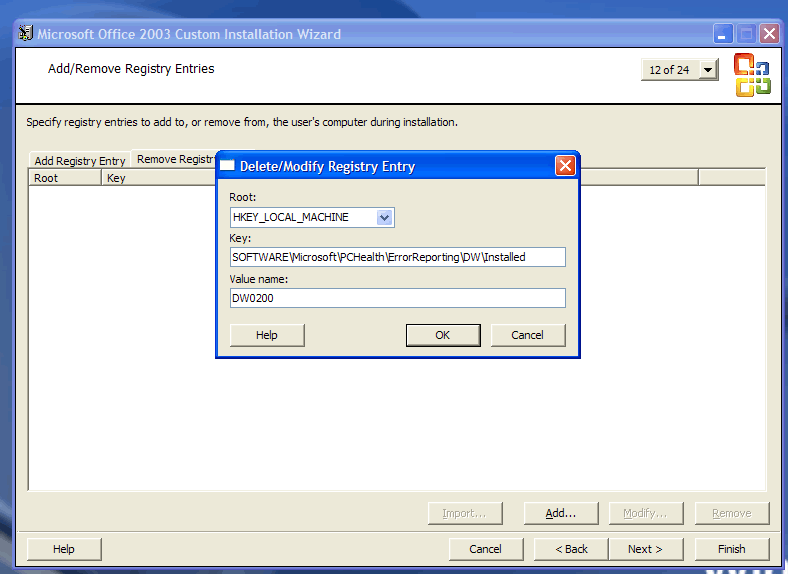
  3. IMPORTANT NOTE: use ONLY your own Office2003 distribution According: http://www.msfn.org/board/lofiversion/index.php/t28820.html and http://www.msfn.org/board/index.php?showto...1&hl=office I just tested eryen idea to delete some registry from pro11.msi . So, after that I can install Office 2003 at T13 (with cab/svcpack !). My solution : 1. Slipstream Office 2003 kit with SP3 2. Install admin version into fresh virtual machine (providing your serial number, user and company)with setup.exe /a and save all into new Office 2003 folder 3. Modify Office setup with Microsoft Office Resurce Kit and generate a NEW setup.MST file: - run: Custom Instalation Wizard from Microsoft Office Resurce Kit - point them to PRO11.msi - make all changes for packets to be installed/removed - IMPORTANT: at 12/24 step choose “ Remove Registry Entry” tab and select Add and complete next form with: • Root: HKEY_LOCAL_MACHINE • Key: SOFTWARE\Microsoft\PCHealth\ErrorReporting\DW\Installed • Value Name: DW0200 • 4. Choose OK and Finsih and save your new *.MST as setup.MST into your Office2003 setup folder. 5. Create a SFX archive using WinRar and select SFX option : • Into “Run After extraction” write : setup.exe /wait TRANSFORMS=setup.mst /qn • In modes tab check: Unpack to temp folder, Hide all, Overwrite all • Save your archive as office 2003.exe 6. make new Add-on cab with NLITE ADD-ON MAKER and chose to execute your SFX archive (office2003.exe-created at step 5) 7. Insert your add-on with NLITE as new hotfix and create a new XPCD image !


Account

Navigation

Configure browser push notifications

Chrome (Android)
  1. Tap the lock icon next to the address bar.
  2. Tap Permissions → Notifications.
  3. Adjust your preference.
Chrome (Desktop)
  1. Click the padlock icon in the address bar.
  2. Select Site settings.
  3. Find Notifications and adjust your preference.