



Skip to content
View in the app

A better way to browse. Learn more.

MSFN

A full-screen app on your home screen with push notifications, badges and more.

To install this app on iOS and iPadOS
  1. Tap the Share icon in Safari
  2. Scroll the menu and tap Add to Home Screen.
  3. Tap Add in the top-right corner.
To install this app on Android
  1. Tap the 3-dot menu (⋮) in the top-right corner of the browser.
  2. Tap Add to Home screen or Install app.
  3. Confirm by tapping Install.

cgwen64

Member
  • Joined

  • Last visited

  • Country

    United States
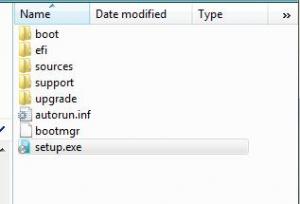
  1. I am a newbie to this and I have a question. I have my Vista DVD copied to my hard drive and I am trying to use WPI but there already is another folder called Sources within the copied DVD files, so I am a little confused about where to put my unrar sources file. Here is a look at the folder structure of my DVD files. I am going to put the WPI folder within this folder structure but still unsure where to put the extracted sources folder. Any help would be apprecited. Thanks, CG
Account

Navigation

Configure browser push notifications

Chrome (Android)
  1. Tap the lock icon next to the address bar.
  2. Tap Permissions → Notifications.
  3. Adjust your preference.
Chrome (Desktop)
  1. Click the padlock icon in the address bar.
  2. Select Site settings.
  3. Find Notifications and adjust your preference.