-
When I Play PES 2008 or any game on gamepad only, the system does not detect Activity and the screen shut off. Anyone else has this problem?
-
I must follow the folder Hierarchy $oem$\$1\$$rename.txt $oem$ folder on winnt32.exe goes outside I386 folder, but I think with winnt.exe goes inside, maybe doesn't hurt put in both.
-
Yes, I did a winnt32 installation, but the errors was the same using winnt32.exe under BartPE and winnt.exe before using aiteru's method(NO IE, NO WMP, NO CALC and some others stuff that I didn't checked.
-
try rename msjetol1.dll to msjetoledb40.dll ExamDiff tells the files are identical. EDIT!!!! Tested now, result: Clean setuperr.log using aittersu's method, using the following $$rename.txt [\WINDOWS\System32\WBEM] evtgprov.dll = "CmdEvTgProv.dll" evtgprov.mof = "CmdEvTgProv.mof" Napprov.mof = "NapClientProv.mof" NapSchem.mof = "napclientschema.mof" [\WINDOWS\SYSTEM32] msjetol1.dll = "msjetoledb40.dll" IE, WMP tested and working, installation done using BartPE and winnt32 /unattend:.\winnt.sif /SYSPART:c:
-
I have the same problems using winnt32.exe under BartPE... Missing IE, Media Player calc...
-
Same here. Appwiz.cpl -> components and just advance and IE was installed. Did you used HFSLIP?
-
Thanks for the answers, I will try hfslip and some minor changes on nlite latter.
-
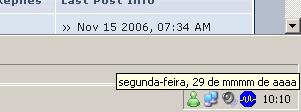
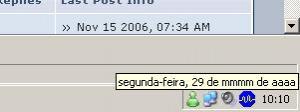
On my hfslip windows XP SP2 pt-br, the date is show "29 de mmmm de aaaa" when it should be 29 de novembro de 2007 To make the things clear, I first Nlite only drivers and unattended options, then I run hfslip. HFSLIP.rar
-
I will try! Thanks!!!!
-
I turn my WinXP instalation Folder in a ISO file, run in a VM and the OEM folders works correctly... So I format my C partition and install from harddrive (Using DOS) with the command winnt -s:[source] -u[source]\winnt.sif The instalation goes unattended but the cmdlines.txt and $OEM$ folders are not copied to my harddrive.... (My english is poor!!!!)