Skip to content
View in the app

A better way to browse. Learn more.

MSFN

A full-screen app on your home screen with push notifications, badges and more.

To install this app on iOS and iPadOS
  1. Tap the Share icon in Safari
  2. Scroll the menu and tap Add to Home Screen.
  3. Tap Add in the top-right corner.
To install this app on Android
  1. Tap the 3-dot menu (⋮) in the top-right corner of the browser.
  2. Tap Add to Home screen or Install app.
  3. Confirm by tapping Install.

JimFear

Member
  • Joined

  • Last visited

  • Country

    United Kingdom

Everything posted by JimFear

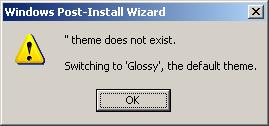
  1. Hi, I'm trying to make a custom theme for some builds I do at work but upon removing the standard themes (as they're not needed) I get an error saying "Theme does not exist, switching to glossy", yet the custom theme I did is working showing up ok otherwise. This only comes up when I go to the options page so I can only imagine there's something embedded elsewhere that references another theme, I've checked all through my current theme for any references to other folders but cannot see anything that could be of use. Does anyone know of anything I can look for? I'm new to all this so any help would be great.


Account

Navigation

Configure browser push notifications

Chrome (Android)
  1. Tap the lock icon next to the address bar.
  2. Tap Permissions → Notifications.
  3. Adjust your preference.
Chrome (Desktop)
  1. Click the padlock icon in the address bar.
  2. Select Site settings.
  3. Find Notifications and adjust your preference.