Skip to content
View in the app

A better way to browse. Learn more.

MSFN

A full-screen app on your home screen with push notifications, badges and more.

To install this app on iOS and iPadOS
  1. Tap the Share icon in Safari
  2. Scroll the menu and tap Add to Home Screen.
  3. Tap Add in the top-right corner.
To install this app on Android
  1. Tap the 3-dot menu (⋮) in the top-right corner of the browser.
  2. Tap Add to Home screen or Install app.
  3. Confirm by tapping Install.

vijaysingh

Member
  • Joined

  • Last visited

  • Country

    Guyana

Everything posted by vijaysingh

  1. vijaysingh posted a topic in nLite
    I have tried all you guy say still same problem i replace all the root files download them and still they dont seem to work i am still getting the insert xp dish error i even try using Ultra ISo to burn and i am getting the same problem any other sugessions or help ..........
  2. Thanks guys for the help guys it was real kind sharing knowledge do appriciate it a lot regards Vj
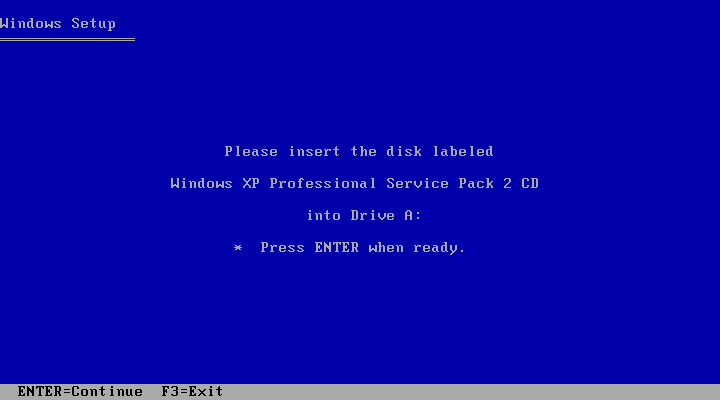
  3. Hey all i made an nLite cd for the 6 time and i am getting an error at the beginning the error is at the startign of the process it stop copying files and ask me to insert Windows XP Profesional CD in drive :a can you help me or telling me where i am going wrong
Account

Navigation

Search

Search

Configure browser push notifications

Chrome (Android)
  1. Tap the lock icon next to the address bar.
  2. Tap Permissions → Notifications.
  3. Adjust your preference.
Chrome (Desktop)
  1. Click the padlock icon in the address bar.
  2. Select Site settings.
  3. Find Notifications and adjust your preference.