-
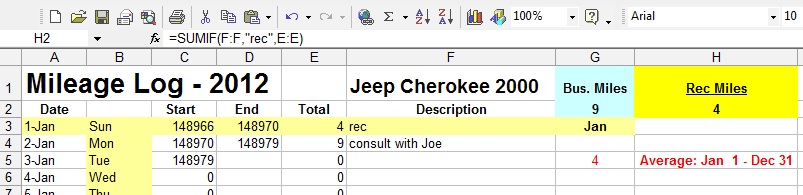
Hi I'm using Excel (2003) to record auto mileage. I have it set up well enough except for one thing. Please refer to the screenshot. Columns A – D are self-explanatory, start and end mileage, etc Column E is the total miles for the day Column F describes gen'l info for the day. Cell G 2 is total business miles Cell H 2 (highlighted in screenshot) is total “rec” or recreation miles Notice the formula for H 2 –> =SUMIF(F:F,”rec”,E:E) This means that if I type rec in column F, as in F 3, the miles are considered recreation miles, and therefore are recorded in cell H 3. Conversely, if rec is not typed in, (as in cell F 4), then the resulting mileage goes to cell G 3. So far so good. The problem is, if I want to type in rec and additional info, eg “rec, went to store”, then the mileage shifts to column G instead of H. ie, The rec miles become business miles. My question is, how do I amend the formula so it will record “rec” miles, but I can also write other info in the same cell in Column F. Hope this is clear. Thanks in advance for your help.
-
Hi, I'm running Windows 7 on an Acer 5517. I replaced Office 2007 with Office 2003 (because I like 2003 better). This was about a year ago. The problem is: when I download Windows Updates it doesn't read my Office 2003. So when I try to get into Word or Excel it can't find the files. i did a system Restore and got it back, but is there a way around this? If I need some important updates I should probably have them, but I don't want to keep running into this. (And I still don't want Office 7) (It did this during last summer too, so I stopped installing the updates. I haven't updated since, except for today) Anyone know which Windows update files I should avoid in the future, and which will not affect the Office '03 programs? Or is this asking too much? Or do I need to find Office 2003 updates to sync with Win 7? Or maybe it's time to switch to Linux?? FYI: ACER Processor: AMD Athlon 64 x2 Dual-core Processor TK-42 1.60 GHz RAM: 3 G (350 G HD) System type: 64 bit OS Hope this is clear. B) Thanks, m
-
Where can I locate defaults for MS Office (specifically Word) and make changes? EG, Sometimes my window doesn't open up all the way on opening. I have Office 2002.
-
Thanks. I am having some confusion about this, especially since another forum states that I need SP 1a OR Sp2 before installing SP3. My version of XP contains SP1 (not 1a, I presume). Are you saying, therefore, that after XP install I can install SP3 without installing SP1a or SP2? My confusion may stem from thinking that SP3 includes all the previous versions, that SP3 is a "stand alone" version, but apparently it is not?
-
I am re-installing XP and am confused about service packs. I have been getting the SP2 updates, and now am getting SP3. My question is, when I reinstall SP, do I still need SP2, or can I simply download and install the current SP3? Thanks
-
heh heh. Thanks
-
In Microsoft Word (2000): Tools>Options>Save What is the difference between: *Allow background saves *Allow fast saves *Save Auto Recovery data every ___minutes *Always create backup copy Thanks