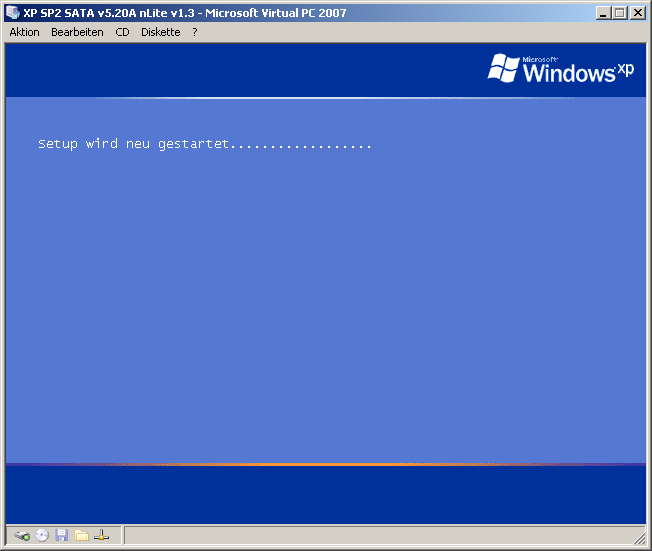
Hi everybody, I built an unattended XP installation CD with nLite v1.3 (SP2, VIA SATA v5.20A). For testing purposes, I would like to install it to a virtual environment, namely VirtualPC 2007. After copying, configurating and restarting properly, the XP setup jumps in again. But instead of going on, the message stated below shows up and the setup starts its work from the beginning. This problem occurs regardless of the virtualisation program (VirtualPC 2007, VMware Workstation v5.5.3). Without altering the setup files, the installation on the virtual machine runs as usual. The tweaked CD works in "real mode" (without any virtualisation software) as well. Could you give me a little hint to make this CD work, please? My WINNT.SIF, created by nLite: ; Generated by nLite 1.3 [Data] AutomaticUpdates="No" Autopartition=0 MsDosInitiated=0 UnattendedInstall="Yes" [Unattended] UnattendMode=FullUnattended UnattendSwitch="Yes" OemPreinstall="No" OemSkipEula="Yes" FileSystem=* WaitForReboot="No" NoWaitAfterTextMode=1 NoWaitAfterGUIMode=1 DriverSigningPolicy=Ignore NonDriverSigningPolicy=Ignore [Display] Xresolution=1280 Yresolution=800 BitsPerPel=32 [GuiUnattended] EncryptedAdminPassword="No" AutoLogon="Yes" AdminPassword=* TimeZone=110 OEMSkipRegional=1 OemSkipWelcome=1 [Shell] DefaultThemesOff="Yes" DefaultStartPanelOff="Yes" [Components] [UserData] ProductKey="XXXXX-XXXXX-XXXXX-XXXXX-XXXXX" ComputerName=WWSHOME FullName="XXX" [RegionalSettings] Language= "0407" [Networking] InstallDefaultComponents="Yes" [WindowsFirewall] Profiles=WindowsFirewall.TurnOffFirewall [WindowsFirewall.TurnOffFirewall] Mode=0 Thank you. WW I tried to search this forum for similar topics, but didn't find any. Besides I hope this is the right forum section.