Skip to content
View in the app

A better way to browse. Learn more.

MSFN

A full-screen app on your home screen with push notifications, badges and more.

To install this app on iOS and iPadOS
  1. Tap the Share icon in Safari
  2. Scroll the menu and tap Add to Home Screen.
  3. Tap Add in the top-right corner.
To install this app on Android
  1. Tap the 3-dot menu (⋮) in the top-right corner of the browser.
  2. Tap Add to Home screen or Install app.
  3. Confirm by tapping Install.

amituofo

Member
  • Joined

  • Last visited

  • Country

    Hong Kong
  1. oh yeah, ok now, thanks Jeremy
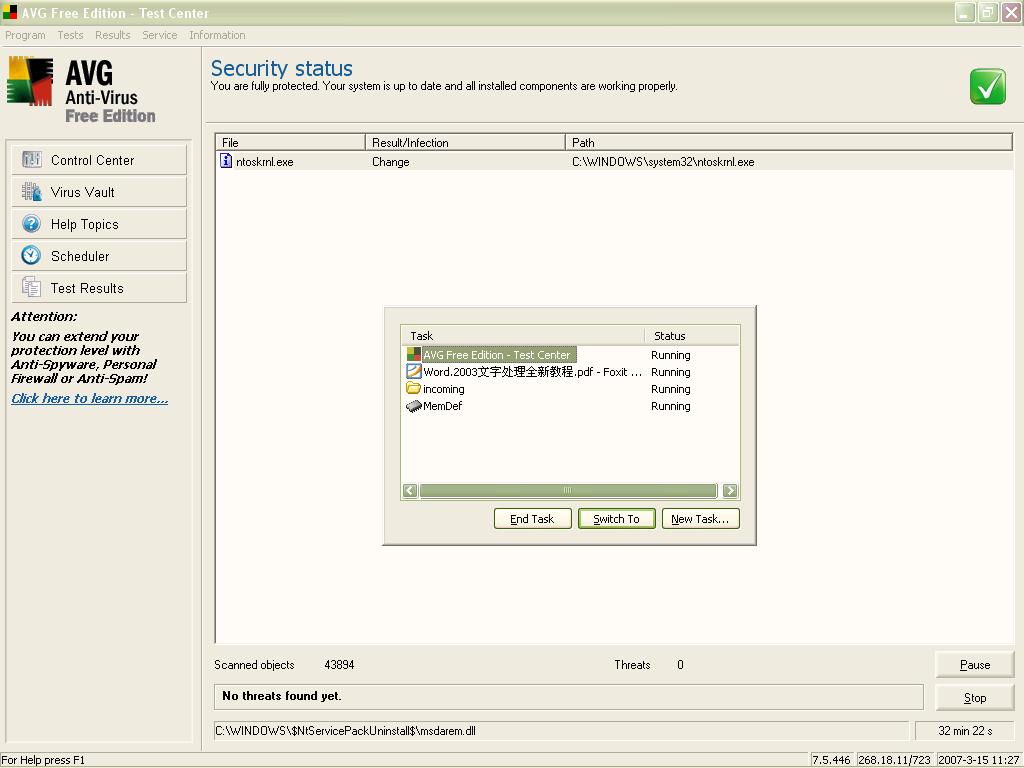
  2. whoops... just realize that c:\windows\taskman.exe doesn't run while ctrl+alt+del shows up the weird taskman program!
  3. Hi There, I've a weird task manager behavior. I thought my PC has got virus infected. AVG is running and finds that ntoskrnl.exe has been changed. is this the problem? how to cure this because AVG couldn't handle it! thanks in advance email: hide2may@yahoo.com.hk
  4. Hi there, my company has several PCs, using XP, forming a LAN and are able to connect to the Internet through switch and ADSL modem etc. My boss wants to modify the network such that the guest account on each PC can only access LAN, including local server, but not the Internet. How can I do that? Any clues? Thanks in advance ;-) hide2may@yahoo.com.hk
Account

Navigation

Search

Search

Configure browser push notifications

Chrome (Android)
  1. Tap the lock icon next to the address bar.
  2. Tap Permissions → Notifications.
  3. Adjust your preference.
Chrome (Desktop)
  1. Click the padlock icon in the address bar.
  2. Select Site settings.
  3. Find Notifications and adjust your preference.