ElAguila
Content Type
Profiles
Forums
Events
Everything posted by ElAguila
-
Thanks for the reply. It will be a couple of days before I get back home but when I do I will upload the dmp file and let you know.
-
I am having issues when rebooting on my Latitude 10 with windows 8. The reboot hangs and it reboots again then boot up and tells me that the pc did not shut down properly. I wanted to run the boot analyzer but I need to get this issue resolved first. The event log says it recovered from a bugcheck. If I shutdown and then start it up there are no issues. I only does it on the restart command. If I configure it to start in safe mode it reboots without issue. I have disabled everything that I can on startup. Any other ideas what I can do to find the cause of this? Here is the bugcheck The bugcheck was: 0x0000007e (0xc0000005, 0x936dac9b, 0x889d85e8, 0x889d81b0).
-
I was looking in the performance information on my tablet and it said that ntvdm.exe was slowing down the boot time of the tablet. Is there any way to tell which device or driver needs this to run at startup?
-
Does anybody know of a shortcut that can be created that would allow you to enable or disable the Bluetooth and/or the GPS? Or at least a shortcut to bring up the Wireles screen of the PC settings? There are a lot of clicks/touches involved and it would be nice if there was a shortcut to do this.
-
I just replaced my c drive with a samsung 830 120gb ssd drive. I did a clean install of Windows 8 Pro and it went great and I am very happy with the speed. But when my pc comes out of sleep mode or hibernate mode, it freezes for a minute and there is the blue screen that says the pc has to restart because of a problem and it shows DPC Watchdog violation and the issue. I have been searching the web and I have not found a solution so far that applies. The drive has no errors on it and I ran chkdsk. I have nothing else installed at this time.
-
I have a friend that had a pc with Vista installed on a 320gb drive. He added a 2TB drive to his system. Then he upgraded to Windows 7. When he did the upgrade it wrote the boot info to the 320gb drive(now his D drive) instead of the 1tb drive(now his C drive) but Windows installed to the 1tb drive.. He wants to remove the 320gb drive but when he unplugs it it the system won't boot. It says it can't find the boot drive. Is there a simple way to get it to boot from the drive where the windows 7 installation is without having to install windows again?
-
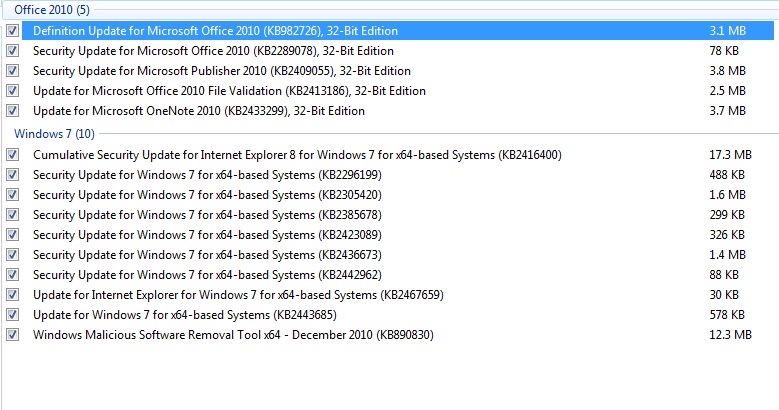
I am running Windows 7 Home Premium x64. I got a notification telling me that were updates available. After doing these 15 updates(some were for office and some for windows) I let it restart my computer. After the system booted back up and I logged in, I could no longer get the task manager to launch. I tried it from a shortcut I have, from right clicking on the start bar and from using the ctl alt del method. It would not launch. I got no message or anything. It would not work on any of my logins. The only way to get it working again was to perform a system restore to before the updates. I have attached a jpg which lists the updates that I said yes to. Any ideas what might be happening. I use NIS 2011 for security suite and haven't had this issue before. I have scanned my system with NIS and Spybot Search and Destroy and found nothing wrong.