-
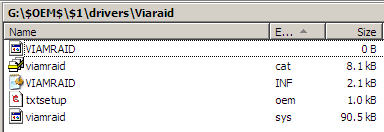
ok, I am really frustrated with all the drivers and sif files and $oem$ etc..etc...etc I've been trying for two days to get XP installed on a samsung 160GB SATA. my board is an old MSI KT6 Delta (has both Promise 20378 and VT8237 V2.31) I didnt know which one to use, but for now I've been trying to get 8237 working. with promise I cant even get the the drivers to load .. my problem is that after an unattended setup, at the first boot I get the blue screen with STOP 000............ I downloaded the drivers from MSI's web site ... winnt.sif [Unattended] UnattendMode=FullUnattended OemSkipEula=Yes OemPreinstall=Yes OemPnPDriversPath = "drivers\Viaraid" TargetPath=\WINDOWS TXTSETUP.SIF [SourceDisksFiles] viamraid.sys=1,,,,,,3_,4,1 [HardwareIdsDatabase] PCI\VEN_1106&DEV_3349="VCOMBORAID_I386_NT5" PCI\VEN_1106&DEV_0591="VCOMBORAID_I386_NT5" PCI\VEN_1106&DEV_3249="VCOMBORAID_I386_NT5" PCI\VEN_1106&DEV_3149="VCOMBORAID_I386_NT5" PCI\VEN_1106&DEV_3164="VCOMBORAID_I386_NT5" [SCSI.load] VCOMBORAID_I386_NT5=viamraid.sys, 4 [scsi] VCOMBORAID_I386_NT5="VIA VT8251/8237/8237A/6421/6410 SATA RAID Controller(Windows 2K/XP/SRV2003)" txtsetup.oem how do I get rid of the folder paths in [disks]? Is it supposed to be : [Disks] D-I386-NT5-RAID="VIA RAID Combo Driver Diskette",\ ,\NT5 [Disks] D-I386-NT5-RAID="VIA RAID Combo Driver Diskette",\I386\VIAMRAID, \NT5 D-I386-NT4-RAID="VIA RAID Combo Driver Diskette",\I386\VIAMRAID, \NT4 [Defaults] scsi = VCOMBORAID_I386_NT5 [SCSI] VCOMBORAID_I386_NT5="VIA VT8251/8237/8237A/6421/6410 SATA RAID Controller(Windows 2K/XP/SRV2003)" VCOMBORAID_I386_NT4="VIA VT8251/8237/8237A/6421/6410 SATA RAID Controller(Windows NT4)" [Files.SCSI.VCOMBORAID_I386_NT5] driver = D-I386-NT5-RAID, viamraid.sys, CFG_NT5 inf = D-I386-NT5-RAID, viamraid.inf catalog = D-I386-NT5-RAID, viamraid.cat [Files.SCSI.VCOMBORAID_I386_NT4] driver = D-I386-NT4-RAID, viamraid.sys, CFG_NT4 inf = D-I386-NT4-RAID, viamraid.inf [config.CFG_NT5] value = parameters\PnpInterface,5,REG_DWORD,1 [config.CFG_NT4] value = "", Tag, REG_DWORD, 1 [HardwareIds.scsi.VCOMBORAID_I386_NT5] id = "PCI\VEN_1106&DEV_3349","viamraid" id = "PCI\VEN_1106&DEV_0591","viamraid" id = "PCI\VEN_1106&DEV_3249","viamraid" id = "PCI\VEN_1106&DEV_3149","viamraid" id = "PCI\VEN_1106&DEV_3164","viamraid" also viamraid.sys cabbed in i386.... any thoughts ? thanks