Everything posted by drcatj18
-
I Have A Welcome/Logon Screen I Want To Incorporate In My Nlite Installation Of XP. How Can I Add The Exe File To My Windows Installation? Where Do I Place It?
-
I have tried everything . i used nlite to make my disc. i added all my drivers they all work. Ive made many xp discs but this is the first that seems to give me a problem. could it be virtual pc's fault? i checked all settings installed virtual services for them too. but it still wont connect to the host connection. i want to see if my AV updates correctly on the virtual machine but now i cant even try that. any ideas or suggestions.
-
I Tried To Silently Install ESET Smart Security 3.0. Heres The .sfx comment Setup=ESET.msi /qn TEMPMODE Setup=REGEDIT.exe /S Server.reg Setup=REGEDIT.exe /S MyRegInfo.reg Silent=1 Overwrite=1 the .msi is stright from their site the trial i just renamed it to ESET. After i install on a new machine the real time file and anti-spyware are ot accessible says the installation is corrupt. to please reinstall the product. how can i fix this?
-
i use the program edit the screens to my liking. took about an hour. it loads finding the compressed D_l file in my i386 of my disc. it asks to open it i say NO. then edit all the screens and save it and by replacing the winntbbu file with this one in the same location replacing it. i close the program and open it again opeining ym edited screen but the pictures dont load the text and colors do. the picture is the right sizes and everything. why dont it load my background? i even placed the background in i386 as well no luck....
-
thanks a bunch. i made a sp3 disc with my theme using the nlite uxpatch it worked but at T13 of setup it was so slow but then again i captured the iso in MS Virtual PC. with low low ram so... it balances out. thanks alot!
-
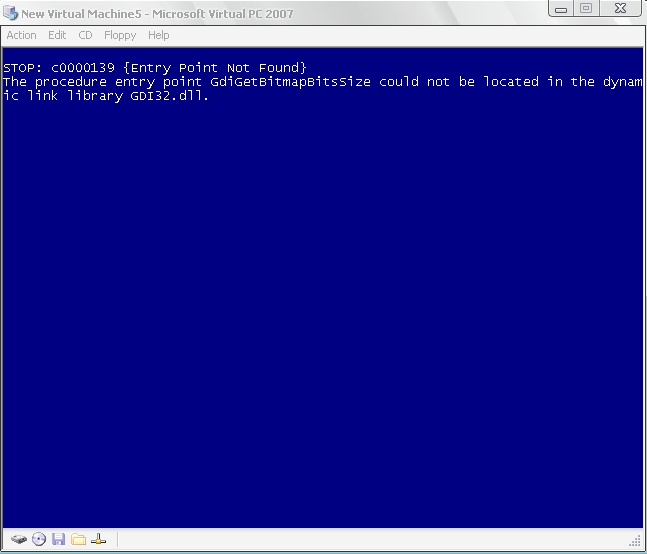
Im Seeking Help From My Superiors Here... I Created My Disc Using Nlite, Added A Theme Using Nlite By Patching The UXtheme File. And Then I Get This Error. Whats It mean What Did I Do Wrong Its WINXP Pro SP3 btw. Whats The Problem? Is It The Theme?

-
Anyone Have A Switch For FlashPeaks SlimBrowser??? I Need To Know Which One To Use Please. Thank You!
-
ok i exoported the .reg from my registry under ie and added it in the .inf and svc pack in i386 and with the IE7 windows setup hotfix for nlite and after i installed the OS everything was fine except some cmd's popping up can i change it to like /VERYSILENT will that make a difference? back to the homepage problem .i clicked on the IE icon and it took me to the default tour with the phising changes and stuff. i want to know if there is any way to edit the settings so i can have ie take you to the homepage on its first run? the homepage.reg didnt work it became msn for some reason please help me.
-
Nero6.exe /SILENT /NOREBOOT /SN=xxxx-xxxx-xxxx-xxxx-xxxx-xxxx /WRITE_SN i want ti to install using that serial and no reboot is that right?
-
i need to have them all silently install with windows via SVCPACK but dont know the switches for any of them. CUSTOMIZER XP EVEREST.Ultimate G-Force 3.55 Nero-6.6.1.15 Burning Rom PowerDVD 7 PremiumBooster UltimateDefrag 1.29 DAMN_NFO_Viewer V2 dir2file minilyrics TreeSize xray pc unlocker fullspeed 2.1
-
wait a minute you held the off button on the pc? why not just exit the game and then shutdown?
-
Thank You For Everything Kelsenellenelvian I Hearby Dedicate This Post To Kelsenellenelvian For His Time And Patience He Is Truly The Best
-
-
i need to learn how to do a silent install or any install while using nlite for my unattended version iw ant to add the following appz. IE 7 XoftSpy SE 4.29 Avast 4.7 Pro Anti-Virus Any clue how to get this fully installed in my unattened using nlite ??? i followed the help files and tutorial but cant get it to work . also is it possible to have these programs fully registered without the use of a crack./keygen after installation?
-
where do i add these? and how do i get all of these to work do i have to add the installation files to the software in the unattended windows xp pro sp2 i made and where?
-
i just reduced my copy of windows 171 MB by getting rid of unneccessary language packs and stuff does anyone know where i can get the runonce scripts for xoftspy se 4.29 limewire pro 4.13 avast 4.7 pro flashget nero 7 premium internet explorer 7 i need scripts or something to enter in the runonce section of nlite so when the user first signs on after installing all of the setup files will pop up telling to install or if possible pre installed anyone know how to do so??? any help will be greatly appreciated
-
thank you all can someone post how to add them?
-
im looking for the scripts for these programs To Be Installed With The Windows XP Pro Setup. I Use N-lite And Windows Unattended cd creator im lost as far as software and how to add them to be installed with the setup. Xoftspy SE 4.29 Avast 4.7 Pro TuneUp Utilities 2006 LimeWire Pro i need to learn how to add scripts the codes are crazy im a newbie