PDU
About PDU

PDU's Achievements
3
Reputation
-
Questions about Win386 support info in MS-DOS 7.1 data segment
PDU replied to PDU's topic in Windows 9x/ME
I solved this myself. 1) UDF1: INDOS_flag synonymous outside SDA. In all DOSCODE residential part, all UDF1 operation are coupled with the same operation to the INDOS flag. All INDOS flag operations are also coupled with UDF1, with only one reading operation. UDF2: A flag indicating critical device driver operation in progress. There are only two occurance (Set/Clear) in DOSCODE residential part on this flag. Between the two operation, only call device driver strat_proc and intr_proc. This only happens when operating some device, not all. 2) See above. -
Questions about Win386 support info in MS-DOS 7.1 data segment
PDU replied to PDU's topic in Windows 9x/ME
Thank you, I think this helps with my question 2). According to your guess, this reform the structure to Opt_Instance_Table struct dw offset sysinittable, 0, CC ; 00 00 C9 00 CC 00 ; This makes sense 0000 + 00CC = 00CC (This is the beginning of SFT) dw offset dosdata:carpos,0, 114DH ; F9 01 C9 00 4D 11 ; This makes sense: 01F9 + 114D = 1346 (This is the begining of DPB) dw 0, 0 ; 00 00 00 00 Opt_Instance_Table ends So, this struct provides two areas for ??? purpose, excluding SFT and DPB. -
I did some digging about the Win386 support info data structures inside MS-DOS 7.1 data segment (The segement you can obtain by using INT 21H, AH=52H). I find that there are several fields in these data structures that I cannot understand. Any one here can give me some hint? Below is my reversed Win386 support info codes, with references from RBIL61, Leaked MSDOS 6.0 source code, and Jeff Parson's SPY source code. Two main questions: 1) What are the meanings of two mentioned flag as UDF1, and UDF2 in the Instance_Table struct? Currently, I know that the flag at offset 12B8 are copied along with INDOS, the flag at offset 12B9 are changed in the process of writing CON. I also know that these two flags are changed in the process of the w command of DEBUG (I use Japth's enhanced DEBUG). 2) What is the meaning of the Fifth field in Opt_Instance_Table struct? I have totally no idea about it. Additionally, is there a detailed map for MS-DOS 7.1 data segment somewhere? I cannot find detailed referecnes for this. Below is my revered struct, offsets and binary dumps are in comments All comments are welcome. ; === ; Win386_Info ; This is from memory dump and inferred based on Jeff Parsons SPY:DOS.INC, and MD6S:dostab.asm. ; MD6S(MS-DOS 6 source code leaks) ; === ; @dosdata:EE1 Win386_Info struct db 4, 0 ; 04 00 dd 0, 0, 0 ; 00 00 00 00 ; 00 00 00 00 ; 00 00 00 00 dw offset dosdata:Instance_Table, 0 ; F7 0E C9 00 dw offset dosdata:Opt_Instance_Table, 0 ; 3D 0F C9 00 Win386_Info ends ; === ; Instance_Table ; UDF1 and UDF2 are two undocumented flags, located just before NLS_DATA ; Tail Zeros seem too long. May be other fields. ; NLS_DATA: the data returned by Int 21H, AX=7000H, RBIL61 ; What are the meaning of UDF1 and UDF2? ; === ; @dosdata:EF7 Instance_Table struct dw offset dosdata:contpos,0,2 ; 22 00 C9 00 02 00 dw offset dosdata:bcon,0,4 ; 32 00 C9 00 04 00 dw offset dosdata:carpos,0,106h ; F9 01 C9 00 06 01 dw offset dosdata:charco,0,1 ; 00 03 C9 00 01 00 dw offset dosdata:exec_init_sp,0,34 ; BF 0E C9 00 00 22 dw offset dosdata:umbflag,0,1 ; 89 00 C9 00 01 00 dw offset dosdata:umb_head,0,2 ; 8C 00 C9 00 02 00 dw offset dosdata:EXECA20,0,1 ; 86 00 C9 00 01 00 dw offset dosdata:UDF1,0,1 ; B8 12 C9 00 01 00 dw offset dosdata:UDF2,0,1 ; B9 12 C9 00 01 00 dw 0, 0, 0, 0, 0 Instance_Table ends ; === ; Opt_Instance_Table ; This is all guessed. I cannot find useful references, except Jeff Parsons SPY:DOS.INC ; dosdata:114D is a position of nowhere among a large piece of zero in my memory dump ; === ; @dosdata:F3D Opt_Instance_Table struct dw 0 ; 00 00 dw dosdata ; C9 00 dw offset dosdata:SFT ; CC 00 dw offset dosdata:carpos,0 ; F9 01 C9 00 dw offset ?? ;What's this? ; 4D 11 dw 0, 0 ; 00 00 00 00 Opt_Instance_Table ends ; === ; Win386_DOSVars ; All from MD6S:dostab.asm ; === ; @dosdata:F4D Win386_DOSVars struct db 5, 0 ; Version ; 05 00 dw offset dosdata:SaveDS ; EC 05 dw offset dosdata:SaveBX ; EA 05 dw offset dosdata:Indos ; 21 03 dw offset dosdata:User_id ; 2E 03 dw offset dosdata:CritPatch ; 15 03 dw offset dosdata:UMB_Head ; 8C 00 Win386_DOSVars ends ; @dosdata: F5B db IsWin386 db Enable_Win3x ; This is from RBIL61, Int 2FH, AX=1231H
-
How to disable the built-in XMS driver in Windows ME's IO.SYS
PDU replied to PDU's topic in Windows 9x/ME
As stated on the homepage of IO8EMMOK. It is only designed for MS-DOS 8.00, not any other version of DOS. Therefore, it is naturally that running it on other versions of DOS causes troubles. -
How to disable the built-in XMS driver in Windows ME's IO.SYS
PDU replied to PDU's topic in Windows 9x/ME
I think what you are trying to do is to load Win3.1CHT using a DOS that can boot within a very limited disk space. Have you tried to use FreeDOS? According to my test, It is capabble of loading WFWG now. See my github record: https://github.com/pufengdu/RetroFuns/blob/main/WFWG/FDWFWG.md It is still not in a perfect status, but can be expected to be better. EDIT: Very interesting to see that RM386 does not work. I remebered that M$ bought RM386 from Helix and its OPTIMIZE program. The memmaker is essentially the same as the OPTIMIZE and EMM386 suppose to be very similar to RM386. QEMM386 / 386MAX do not work as expected. I remembered that I have tried these. -
How to disable the built-in XMS driver in Windows ME's IO.SYS
PDU replied to PDU's topic in Windows 9x/ME
Thanks for the message. I do not play LZ-DOS. Sorry. Besides, the key to load WFWG in msdos8 is to allow GEMMIS in EMM386.EXE to do its work when WFWG inits. If only IO8EMMOK.SYS is loaded, WFWG wont work. Although WFWG should work with only XMS, it is not the case in MSDOS8. BTW2, the EMM386.EXE from PC-DOS 2000 is the best in my test. -
How to disable the built-in XMS driver in Windows ME's IO.SYS
PDU replied to PDU's topic in Windows 9x/ME
Not quit sure. If I remembered right, it works with pwin3.2, that special simplified chinese version. I will give it another try when I have some more time. -
I know this is a DOS question, which may not be suited here. If this is not welcome, just let me know. I encountered this SWITCHES=/I line in the config.sys file in the IBM SGKT. Exact location follows: ibm_sw_sgtk_1_3_07_anyos_anycpu.zip\sgdeploy\sgtk\DOS\cfgfiles\CONFIG.SYS The ZIP file can be downloaded publicly from IBM official site: https://www.ibm.com/support/pages/ibm-serverguide-scripting-toolkit-dos-edition-version-1307 It contains a set of files, which are usually considered as a set of files to upgrade PC-DOS 2000 to PC-DOS 7.1. I can not find any information regarding this line in the CONFIG.SYS. This is special to PC-DOS 7.1,I think. Some preliminary experiments shows that this line seems to affect the 32BFA of WFWG. When this line is missing, WFWG can not enable 32BFA even on a FAT16 partition. When this line is added, the 32BFA is OK in WFWG. Anyone here know about the function of this line SWITCHES=/I in PC-DOS 7.1 ?
-
What is needed to start windows app from command prompt window in windows me.
PDU replied to PDU's topic in Windows 9x/ME
It is just a toy these days, right? I am not intended to make some mini windows. I want to make some "good DOS". I just think that throwing some bones of windows to DOS is a better idea than using various DPMI hosts. As windows is capable of multi-tasking, why not to let DOS act as some local environment, and let windows do all the magics. Just because it is too complicated and too large? But if you keep only the most basic functions. It is not that large. ove 90% of the size can be reduced. Currently, this kind of configuration is good for me to run many retro games. That is enough. I am not going to share the file list now, because I am playing with it, and it is dirty. I will share a clean and proved file list with scripts and configurations once I have cleaned it up. I can tell you how I did it. I followed the recipe here http://reboot.pro/index.php?showtopic=22584 and the pages on wikipedia: https://en.wikipedia.org/wiki/Architecture_of_Windows_9x Copy those files, write a system.ini yourself, mostly the original WinME system.ini, and a skeleton win.ini. Try to run regedit.exe, progman.exe, winfile.exe and notepad.exe. If they complain missing some files, copy them too. If you still have errors, try to use dependency walker to profile that program in a normal installation of Windows ME. Find out what is missing and supply them to your installation. Enventually, you will get a set of files to run these programs. Registry is not necessary for the above set (including the REGEDIT.EXE), although win.com will complain that when booting. The system behaves like Windows 3.x. The command.com can be configured as a shell in the system.ini. In this way, you get multi-tasking DOS environment. The start command can be use to open DOS windows as many as your memory is enough. TSRs and environment vars can be loaded differently in every DOS session. This is interesting. As for the registry again, if you only want these basics, it is not necessary. But if you desire TCP/IP stacks, NetBIOS, NTFS, COM/DCOM, WSH or something related to IE, it is a must. BTW, in this mode of running, there is no place for a real-mode DOS. CONFIG.SYS is not necessary if you do not need to load 16-bit drivers. Therefore, the Windows ME Real Mode DOS patching is not needed anymore. The hard drive version IO.SYS and COMMAND.COM works well in this mode. -
What is needed to start windows app from command prompt window in windows me.
PDU replied to PDU's topic in Windows 9x/ME
Thank your both jaclaz and RainyShadow. I solved this when I was wandering on the wikipedia, and see this https://en.wikipedia.org/wiki/Windows_Console "Windows 9x support is relatively poor compared to Windows NT, because the console window runs in the system virtual DOS machine and so keyboard input to a Win32 console application had to be directed to it by conagent.exe running in a DOS VM that are also used for real DOS applications by hooking the keyboard interrupt. conagent.exe then calls Vcond (which is a VxD). Vcond then had to pass the keyboard input to the System VM, and then finally to the Win32 console application. Besides performance, another problem with this implementation is that drives that are local to a DOS VM are not visible to a Win32 console application. This can cause confusion." I found that my missing piece is called conagent.exe in the system folder. To achieve this, there is no registry setting related. The required elements are PIFMGR.DLL, which allows you to edit the PIF. CRTDLL.DLL, START.EXE, and CONAGENT.EXE, which solve the last problem. -
What is needed to start windows app from command prompt window in windows me.
PDU replied to PDU's topic in Windows 9x/ME
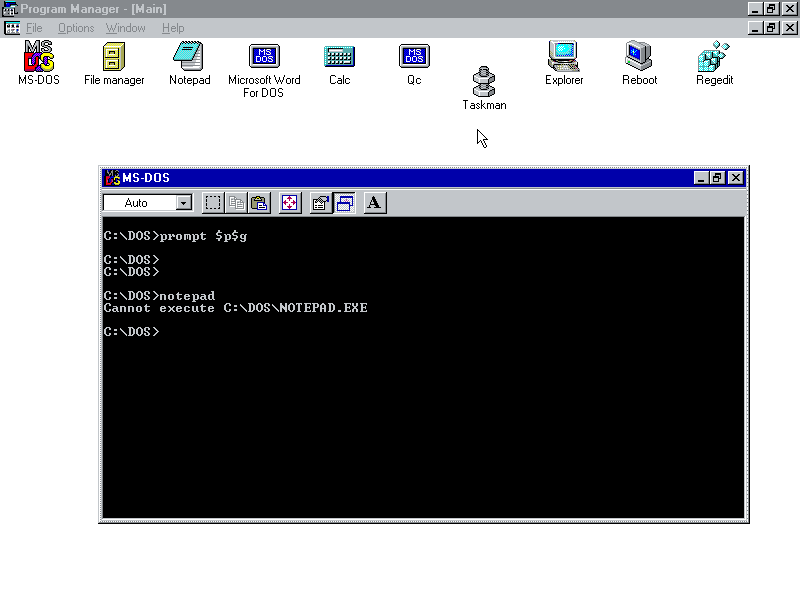
I tried that "start notepad.exe". It does not work. I also tried to change the settings "Prevent MS-DOS-based programs from detecting Windows". By unchekcing that, the error message become can not execute XXXXX, like attached. strat notepad.exe from the progman always works. But it does not start from command prompt.
-
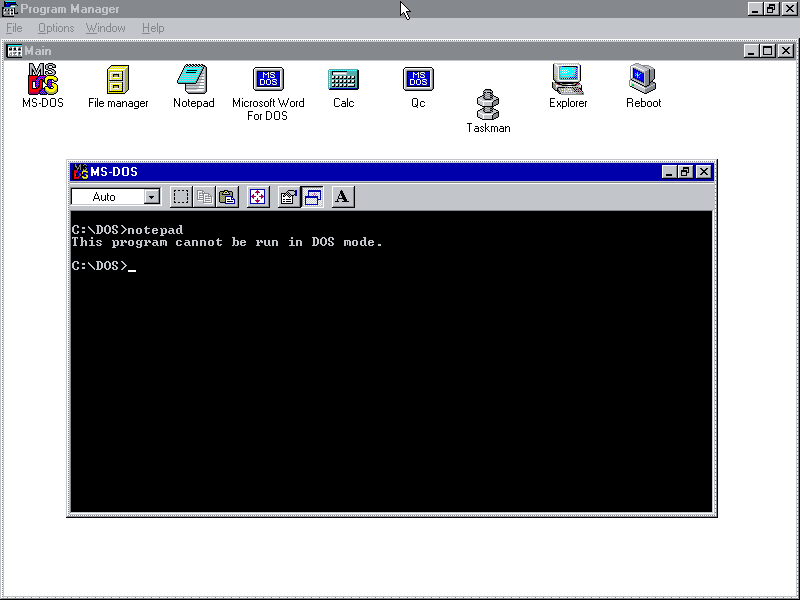
I stripped down the windows me installation. I made a very tiny installation of Windows ME, even without registry. The WINFILE, PROGMAN, TASKMAN and NOTEPAD works well when they are started from the PROGMAN or WINFILE. But, when I tried to start them from command prompt. I got error messages like "This program can not be run in DOS mode". See the attached screenshot for details. How to solve this and restore the normal Windows ME behavior? (Notepad should run if your type notepad in the command prompt window) I know I stripped too much. What is the minimum requirement for restoring this. I guess this may be related to some registry settings, what are the minimum registry settings needed. BTW, the explorer.exe does not work. Seems like some registry settings are needed.
-
How to disable the built-in XMS driver in Windows ME's IO.SYS
PDU replied to PDU's topic in Windows 9x/ME
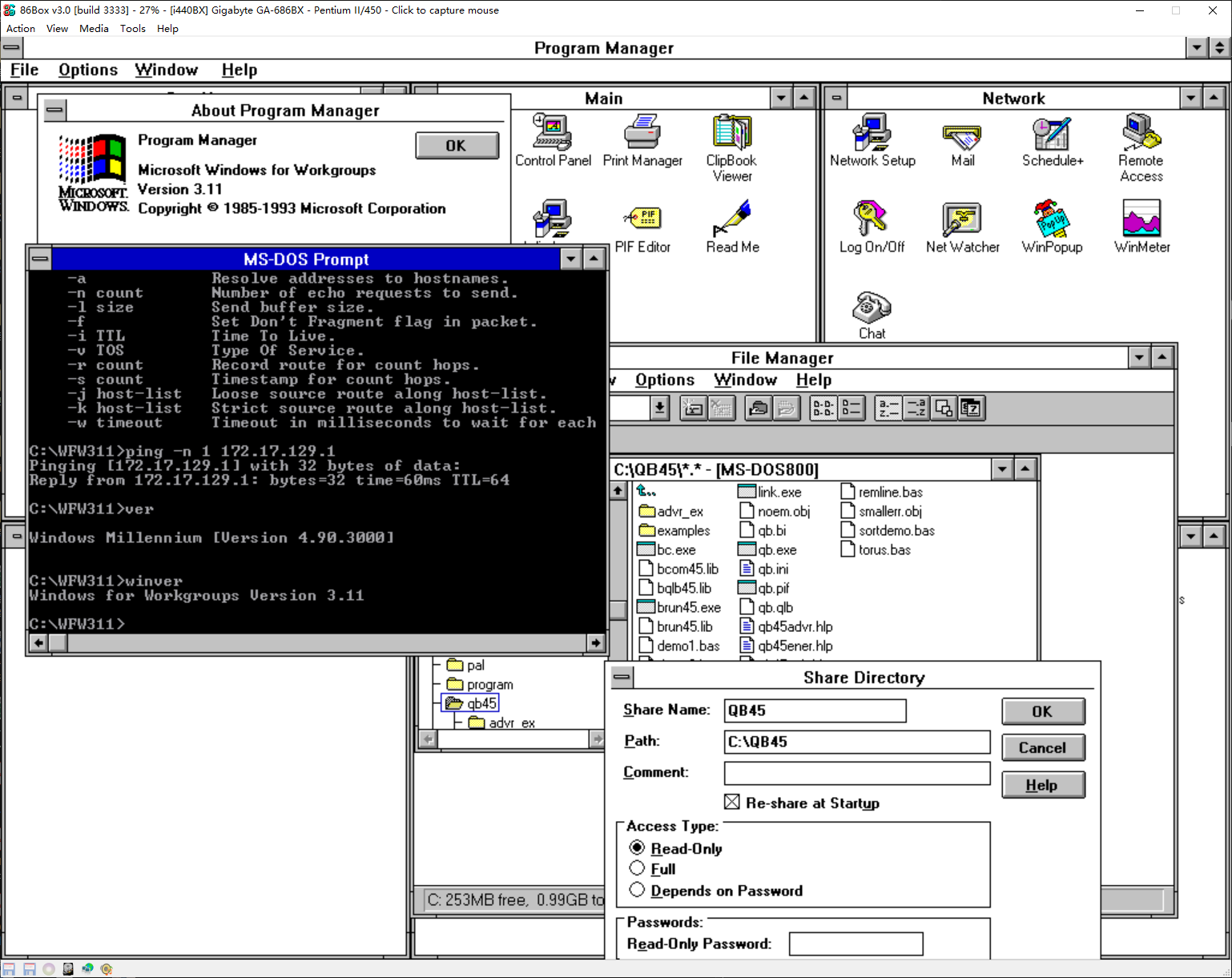
I come back again for some updates. The patches provided by _Smoker and me are for different versions of IO.SYS. It is confusing, but essentially the same thing. The patch knocks out a far call instruction to a procedure that install handlers to INT 15H AH=87H/88H and AX=E801, also INT 2FH AX=4300H / 4310H and 4309H, also the source of some GDT entries. This will make HIMEMX.EXE to work. However, if some one has tried our way of patching, some side effects will be found. like wrong mem command output, system hangs in safe mode, running to massive non-sense output in loading some applications. Also, to start the wfwg in enhanced mode, some tricks like I mentioned must be used. To solve all these problem. I made some analysis and developped a small new driver program for the purpose of loading EMM386 and WFWG. I call it IO8EMMOK. it can be downloaded from GitHub https://github.com/pufengdu/IO8EMMOK IO8EMMOK.SYS is a wrapping driver that convert the built-in XMS driver to a generally normal XMS driver. I wrote the tech details in the comments of the source codes. Here is a short summary of the details of technology. In general MS-DOS 8.0 is a DOS always in HMA without any stub below 1MB. The XMS driver is also in HMA. Since XMS driver is in responsible of controling A20, it becomes a key behind the lock case. Therefore, every time an application abitarily disable A20 and try calling DOS or XMS driver, system reboots or hangs. Every time an application rely on the address wrapping mechanism tried to run, the system reboots or hangs. This is also why MS-DOS 8.0 seems so unstable. Its A20 must be kept ALWAYS ON. However, this is an old case for DOS services, but new to an XMS driver. Most programs, including Win3x, thought the XMS driver is some where below 1MB. Therefore, it should work even with A20 off. But, this is not the case on MS-DOS 8.0. My IO8EMMOK driver provide a very simple wrapping layer to the XMS driver, making it callable with A20 off. In this case, the driver tun on A20, forwad the call, then turn off A20 again. This creates the minimal side effects, but not zero. With this driver, no patch is needed to load EMM386.EXE. Just load the IO8EMMOK.SYS as the first driver in the CONFIG.SYS EMM386.EXE will be happly to load as normal, no HIMEMX.EXE nor HIMEM.SYS. I also adapted the W3XStart patch in this case as a hotfix patch, which only modify memory. It can also be downloaded from the same github repo. There is no need to decompress the IO.SYS. The compressed form IO.SYS with the one-byte real-mode patch can be used now. With the IO8EMMOK driver, and my W3XStart hot fix, it would be easy to start WFWG in enhanced mode. The last element of making this happen, is to use a serial mouse, not PS/2. And set mobo option of Gate A20 to "Normal" The WFWG default mouse driver is not going to work in this way. Update it using Microsoft Mouse Driver 9.01. It is easy to find online. I finally achieved the attached effects. WFWG is fully functioning on MS-DOS 8.0, without hanging, without tricks, without decompressing IO.SYS. If someone found bugs of the driver, fixes are welcome.
-
How to disable the built-in XMS driver in Windows ME's IO.SYS
PDU replied to PDU's topic in Windows 9x/ME
Here is the detail of the patch: Use original Windows ME OEM audit mode IO.SYS. (i.e. the one in those dta files and can boot hdd without patch) Use IO8DCOMP to decompress it In the decompressed file Search 9A 9D 02 21 1F at offset 14689H Replace it with EB 0D 90 90 90 The Built-in XMS Driver will be disabled, but not entirely! HIMEM.SYS can not be loaded. It will hang the system if your try. However, the HIMEMX.EXE, an open source alternative, can be loaded normally with /METHOD:KBC The EMM386.EXE can be loaded with HIMEMX.EXE. After applying W3XStart patch, the following trick must be used to start wfwg in 386 enh mode ren win.com winx.com copy system.ini system.in1 del system.ini winx /3 (You got error) copy system.in1 system.ini winx /3 Now have wfwg in 386 enh mode. Make the above process as win.bat. This seems like correcting one error with another error. But, it works. -
How to disable the built-in XMS driver in Windows ME's IO.SYS
PDU replied to PDU's topic in Windows 9x/ME
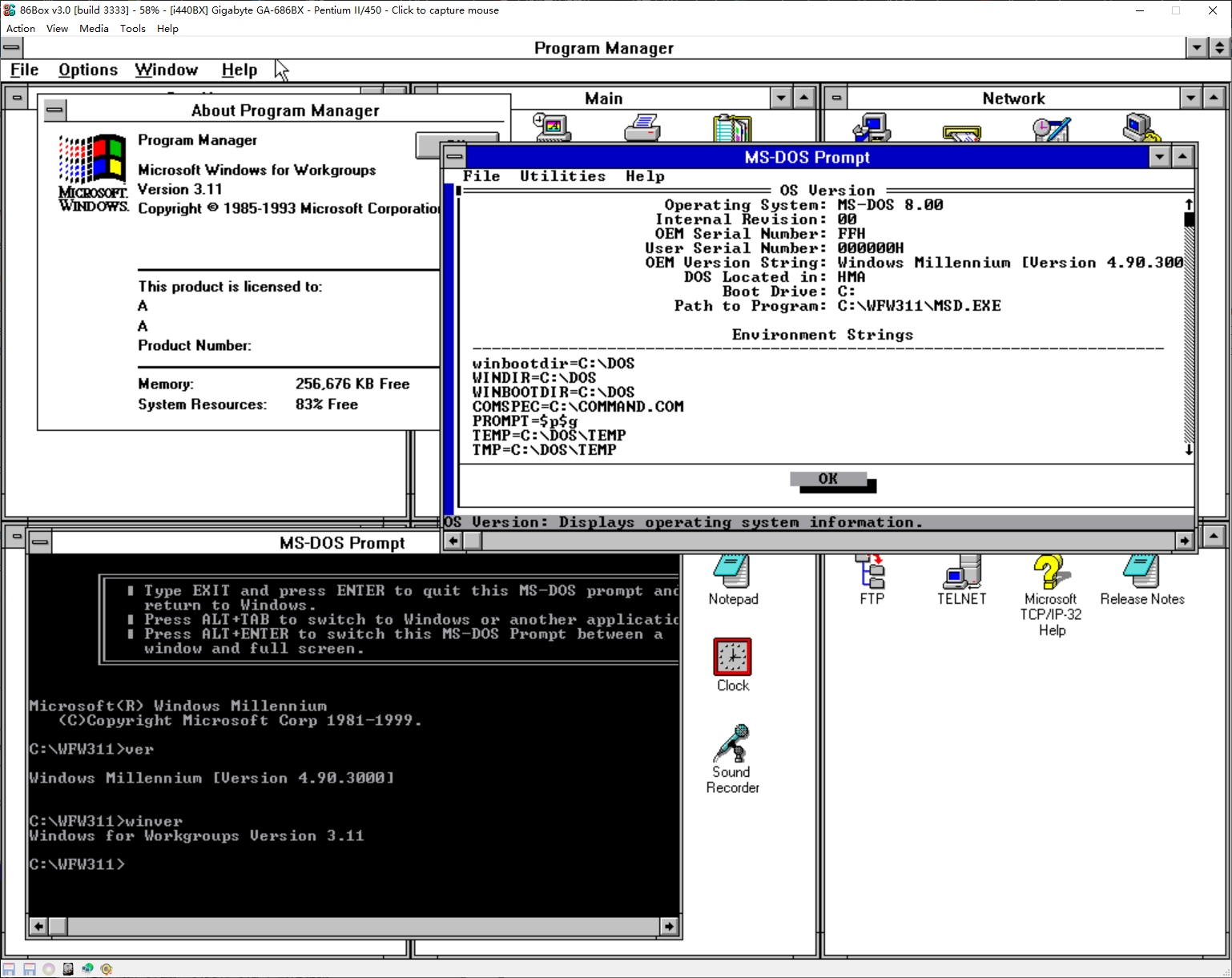
OK,after two sleepless nights. I have done this. The attached screenshot is a WFWG in 386 enhanced mode with msdos 8.0. I tested it in 86Box. I do not have a physical machine for testing. I need some more time to collect all tech details and patches to the IO.SYS In summary, the built-in XMS driver can not be fully disabled, but it can be disabled partially to allow HIMEMX.EXE to be loaded, followed by EMM386.EXE. The W3XStart patch is needed, also the WIN386.EXE patch as here https://www.vogons.org/viewtopic.php?t=31922 and here https://retrocomputing.stackexchange.com/questions/12946/running-dos-windows-3-and-windows-98-from-one-fat32-partition