



Skip to content
View in the app

A better way to browse. Learn more.

MSFN

A full-screen app on your home screen with push notifications, badges and more.

To install this app on iOS and iPadOS
  1. Tap the Share icon in Safari
  2. Scroll the menu and tap Add to Home Screen.
  3. Tap Add in the top-right corner.
To install this app on Android
  1. Tap the 3-dot menu (⋮) in the top-right corner of the browser.
  2. Tap Add to Home screen or Install app.
  3. Confirm by tapping Install.

im2nice4u

Member
  • Joined

  • Last visited

  • Country

    Australia
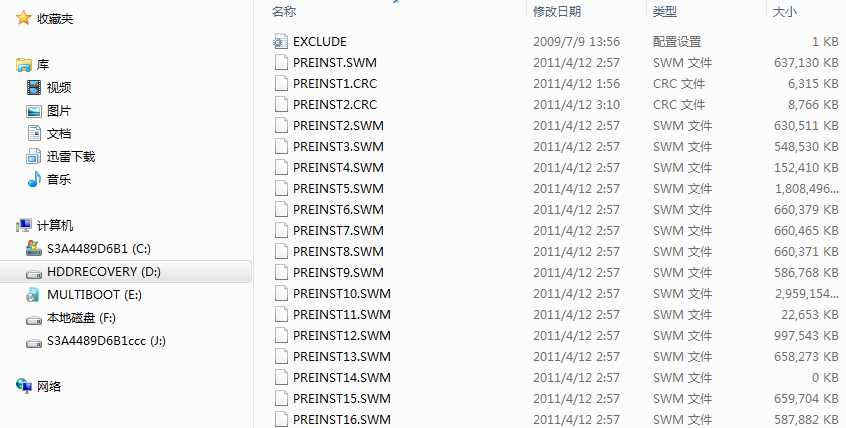
  1. Hi, I gave to my gf my laptop and my gf's nephew dropped milk on it and burned the motherboard. She gave it to a technician to repair in china, since the windows was in english, i guess the tech format it and erased all even the HDDRECOVERY. Now, I came to visit my gf and the laptop has problem, so I used MiniTool Partition Wizrd to recover my partition. Luckily, I found the HDDRECOVERY. I tried all the step but I got stuck on imagex command. I got a msg error : "Error opening file [E:\ZZIMAGES\ZZIMAGES\PREINST.SWM]" Im using win7 x64, model: Toshiba L740. i tried imagex (64bit) same error. I wonder if my files are corrupted, here is a list of my file. Total size = 11.6 gig. I notice my PREINST14.SWM file is 0 kb. Is this normal??? I appreciate any help, regards, im2nice4u
Account

Navigation

Configure browser push notifications

Chrome (Android)
  1. Tap the lock icon next to the address bar.
  2. Tap Permissions → Notifications.
  3. Adjust your preference.
Chrome (Desktop)
  1. Click the padlock icon in the address bar.
  2. Select Site settings.
  3. Find Notifications and adjust your preference.