UsefulAGKHelper
Content Type
Profiles
Forums
Events
Everything posted by UsefulAGKHelper
-
 I noticed that this file has w7 in it. I think this ACPI is for Windows 7.
 -
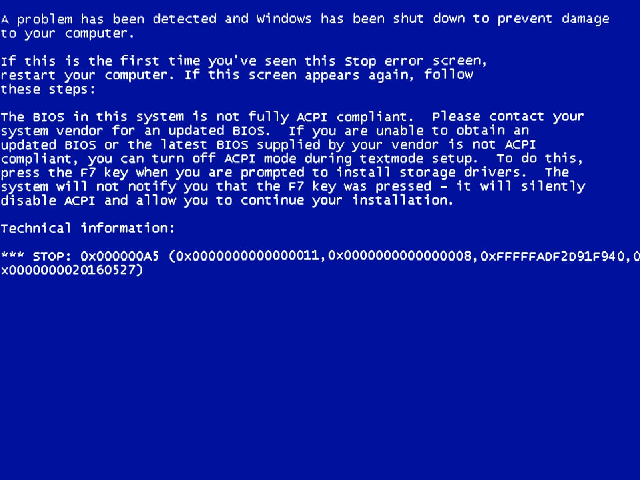
The purpose was for my touchpad controller to turn on from i2cctrl.sys using XP's ACPI.sys. The conclusion is much clearer, patching the ACPI table of XP OSI versions in memory (to avoid bricking anything) to do what Windows 10 OSI version does too, or else the LPSS controller (for touchpads that use Intel's LPSS controller) would never power on. I2cctrl.log (before the patch): [31/05/2026, 01:28 AM] DriverEntry begin [31/05/2026, 01:28 AM] DriverEntry complete (mask=0x00000009) [31/05/2026, 01:28 AM] AddDevice: begin [31/05/2026, 01:28 AM] AddDevice: scanning HWIDs for controller match [31/05/2026, 01:28 AM] AddDevice: HWID candidate: PCI\VEN_8086&DEV_9DE8&SUBSYS_19611043&REV_30 [31/05/2026, 01:28 AM] AddDevice: matched controller PCI\VEN_8086&DEV_9DE8 (index 5) [31/05/2026, 01:28 AM] AddDevice: ControllerId assigned = 1 [31/05/2026, 01:28 AM] FindControllerId: match found [31/05/2026, 01:28 AM] ApplyQuirks: BAR0 NULL -> skipping HW quirks [31/05/2026, 01:28 AM] AddDevice: complete (Ctrl1) [31/05/2026, 01:28 AM] PnP: Entered for device FFFFFADF3B87A5A0, MinorFunction=0x18 [31/05/2026, 01:28 AM] PnP: Device FFFFFADF3B87A5A0 recognized as FDO -> routing to FdoDispatch [31/05/2026, 01:28 AM] FDO: Entered for device FFFFFADF3B87A5A0, Major=0x1B, Minor=0x18 [31/05/2026, 01:28 AM] FDO: Unhandled PnP minor 0x18 -> passing down [31/05/2026, 01:28 AM] AddDevice: begin [31/05/2026, 01:28 AM] AddDevice: scanning HWIDs for controller match [31/05/2026, 01:28 AM] AddDevice: HWID candidate: PCI\VEN_8086&DEV_9DE9&SUBSYS_19611043&REV_30 [31/05/2026, 01:28 AM] AddDevice: matched controller PCI\VEN_8086&DEV_9DE9 (index 6) [31/05/2026, 01:28 AM] AddDevice: ControllerId assigned = 2 [31/05/2026, 01:28 AM] FindControllerId: match found [31/05/2026, 01:28 AM] ApplyQuirks: BAR0 NULL -> skipping HW quirks [31/05/2026, 01:28 AM] AddDevice: complete (Ctrl2) [31/05/2026, 01:28 AM] PnP: Entered for device FFFFFADF3C28D5A0, MinorFunction=0x18 [31/05/2026, 01:28 AM] PnP: Device FFFFFADF3C28D5A0 recognized as FDO -> routing to FdoDispatch [31/05/2026, 01:28 AM] FDO: Entered for device FFFFFADF3C28D5A0, Major=0x1B, Minor=0x18 [31/05/2026, 01:28 AM] FDO: Unhandled PnP minor 0x18 -> passing down [31/05/2026, 01:28 AM] AddDevice: begin [31/05/2026, 01:28 AM] AddDevice: scanning HWIDs for controller match [31/05/2026, 01:28 AM] AddDevice: HWID candidate: PCI\VEN_8086&DEV_9DC5&SUBSYS_19611043&REV_30 [31/05/2026, 01:28 AM] AddDevice: matched controller PCI\VEN_8086&DEV_9DC5 (index 4) [31/05/2026, 01:28 AM] AddDevice: ControllerId assigned = 3 [31/05/2026, 01:28 AM] FindControllerId: match found [31/05/2026, 01:28 AM] ApplyQuirks: BAR0 NULL -> skipping HW quirks [31/05/2026, 01:28 AM] AddDevice: complete (Ctrl3) [31/05/2026, 01:28 AM] PnP: Entered for device FFFFFADF3BEAB040, MinorFunction=0x18 [31/05/2026, 01:28 AM] PnP: Device FFFFFADF3BEAB040 recognized as FDO -> routing to FdoDispatch [31/05/2026, 01:28 AM] FDO: Entered for device FFFFFADF3BEAB040, Major=0x1B, Minor=0x18 [31/05/2026, 01:28 AM] FDO: Unhandled PnP minor 0x18 -> passing down [31/05/2026, 01:28 AM] PnP: Entered for device FFFFFADF3B87A5A0, MinorFunction=0x0D [31/05/2026, 01:28 AM] PnP: Device FFFFFADF3B87A5A0 recognized as FDO -> routing to FdoDispatch [31/05/2026, 01:28 AM] FDO: Entered for device FFFFFADF3B87A5A0, Major=0x1B, Minor=0x0D [31/05/2026, 01:28 AM] FDO: Unhandled PnP minor 0x0D -> passing down [31/05/2026, 01:28 AM] PnP: Entered for device FFFFFADF3B87A5A0, MinorFunction=0x08 [31/05/2026, 01:28 AM] PnP: Device FFFFFADF3B87A5A0 recognized as FDO -> routing to FdoDispatch [31/05/2026, 01:28 AM] FDO: Entered for device FFFFFADF3B87A5A0, Major=0x1B, Minor=0x08 [31/05/2026, 01:28 AM] FDO: Unhandled PnP minor 0x08 -> passing down [31/05/2026, 01:28 AM] PnP: Entered for device FFFFFADF3B87A5A0, MinorFunction=0x08 [31/05/2026, 01:28 AM] PnP: Device FFFFFADF3B87A5A0 recognized as FDO -> routing to FdoDispatch [31/05/2026, 01:28 AM] FDO: Entered for device FFFFFADF3B87A5A0, Major=0x1B, Minor=0x08 [31/05/2026, 01:28 AM] FDO: Unhandled PnP minor 0x08 -> passing down [31/05/2026, 01:28 AM] PnP: Entered for device FFFFFADF3C28D5A0, MinorFunction=0x0D [31/05/2026, 01:28 AM] PnP: Device FFFFFADF3C28D5A0 recognized as FDO -> routing to FdoDispatch [31/05/2026, 01:28 AM] FDO: Entered for device FFFFFADF3C28D5A0, Major=0x1B, Minor=0x0D [31/05/2026, 01:28 AM] FDO: Unhandled PnP minor 0x0D -> passing down [31/05/2026, 01:28 AM] PnP: Entered for device FFFFFADF3C28D5A0, MinorFunction=0x08 [31/05/2026, 01:28 AM] PnP: Device FFFFFADF3C28D5A0 recognized as FDO -> routing to FdoDispatch [31/05/2026, 01:28 AM] FDO: Entered for device FFFFFADF3C28D5A0, Major=0x1B, Minor=0x08 [31/05/2026, 01:28 AM] FDO: Unhandled PnP minor 0x08 -> passing down [31/05/2026, 01:28 AM] PnP: Entered for device FFFFFADF3C28D5A0, MinorFunction=0x08 [31/05/2026, 01:28 AM] PnP: Device FFFFFADF3C28D5A0 recognized as FDO -> routing to FdoDispatch [31/05/2026, 01:28 AM] FDO: Entered for device FFFFFADF3C28D5A0, Major=0x1B, Minor=0x08 [31/05/2026, 01:28 AM] FDO: Unhandled PnP minor 0x08 -> passing down [31/05/2026, 01:28 AM] PnP: Entered for device FFFFFADF3BEAB040, MinorFunction=0x0D [31/05/2026, 01:28 AM] PnP: Device FFFFFADF3BEAB040 recognized as FDO -> routing to FdoDispatch [31/05/2026, 01:28 AM] FDO: Entered for device FFFFFADF3BEAB040, Major=0x1B, Minor=0x0D [31/05/2026, 01:28 AM] FDO: Unhandled PnP minor 0x0D -> passing down [31/05/2026, 01:28 AM] PnP: Entered for device FFFFFADF3BEAB040, MinorFunction=0x08 [31/05/2026, 01:28 AM] PnP: Device FFFFFADF3BEAB040 recognized as FDO -> routing to FdoDispatch [31/05/2026, 01:28 AM] FDO: Entered for device FFFFFADF3BEAB040, Major=0x1B, Minor=0x08 [31/05/2026, 01:28 AM] FDO: Unhandled PnP minor 0x08 -> passing down [31/05/2026, 01:28 AM] PnP: Entered for device FFFFFADF3BEAB040, MinorFunction=0x08 [31/05/2026, 01:28 AM] PnP: Device FFFFFADF3BEAB040 recognized as FDO -> routing to FdoDispatch [31/05/2026, 01:28 AM] FDO: Entered for device FFFFFADF3BEAB040, Major=0x1B, Minor=0x08 [31/05/2026, 01:28 AM] FDO: Unhandled PnP minor 0x08 -> passing down [31/05/2026, 01:28 AM] PnP: Entered for device FFFFFADF3B87A5A0, MinorFunction=0x00 [31/05/2026, 01:28 AM] PnP: Device FFFFFADF3B87A5A0 recognized as FDO -> routing to FdoDispatch [31/05/2026, 01:28 AM] FDO: Entered for device FFFFFADF3B87A5A0, Major=0x1B, Minor=0x00 [31/05/2026, 01:28 AM] FDO: IRP_MN_START_DEVICE -> forwarding + StartCompletion [31/05/2026, 01:28 AM] PnP: Entered for device FFFFFADF3B87A5A0, MinorFunction=0x08 [31/05/2026, 01:28 AM] PnP: Device FFFFFADF3B87A5A0 recognized as FDO -> routing to FdoDispatch [31/05/2026, 01:28 AM] FDO: Entered for device FFFFFADF3B87A5A0, Major=0x1B, Minor=0x08 [31/05/2026, 01:28 AM] FDO: Unhandled PnP minor 0x08 -> passing down [31/05/2026, 01:28 AM] StartDevice: entered [31/05/2026, 01:28 AM] StartDevice: PnpId captured [31/05/2026, 01:28 AM] StartDevice: matched controller PCI\VEN_8086&DEV_9DE8 (BAR0 Offsets: CTRL=10 STAT=14 DATA=18 CLK=1C, quirks=0x2 bsod=0x20000)[31/05/2026, 01:28 AM] StartDevice: got translated resources [31/05/2026, 01:28 AM] StartDevice: MMIO mapped [31/05/2026, 01:28 AM] BAR0[00] = 0x00000000 [31/05/2026, 01:28 AM] BAR0[04] = 0x00000000 [31/05/2026, 01:28 AM] BAR0[08] = 0x00000000 [31/05/2026, 01:28 AM] BAR0[0C] = 0x00000000 [31/05/2026, 01:28 AM] BAR0[10] = 0x00000000 [31/05/2026, 01:28 AM] BAR0[14] = 0x00000000 [31/05/2026, 01:28 AM] BAR0[18] = 0x00000000 [31/05/2026, 01:28 AM] BAR0[1C] = 0x00000000 [31/05/2026, 01:28 AM] BAR0[20] = 0x00000000 [31/05/2026, 01:28 AM] BAR0[24] = 0x00000000 [31/05/2026, 01:28 AM] BAR0[28] = 0x00000000 [31/05/2026, 01:28 AM] BAR0[2C] = 0x00000000 [31/05/2026, 01:28 AM] BAR0[30] = 0x00000000 [31/05/2026, 01:28 AM] BAR0[34] = 0x00000000 [31/05/2026, 01:28 AM] BAR0[38] = 0x00000000 [31/05/2026, 01:28 AM] BAR0[3C] = 0x00000000 [31/05/2026, 01:28 AM] StartDevice: no LPSS BAR2 resource [31/05/2026, 01:28 AM] StartDevice: Connecting interrupt: Vector=417 Level=10 Mode=Level Sharable=1 Affinity=0x000000000000007F [31/05/2026, 01:28 AM] StartDevice: registry policy loaded [31/05/2026, 01:28 AM] StartDevice: PWRMBASE (fixed) = 00000000FE0D0000 [31/05/2026, 01:28 AM] PWRMINFO: Universal PWRMBASE = 0x00000000FE0D0000 [31/05/2026, 01:28 AM] StartDevice: PWRMBASE VA mapped at FFFFFADF2B166000 [31/05/2026, 01:28 AM] StartDevice: LPSS BAR2 mapped at FFFFFADF2AE4D000 (PWRMBASE+0xC000) [31/05/2026, 01:28 AM] StartDevice: === POWER + LPSS DEBUG BEGIN === [31/05/2026, 01:28 AM] StartDevice: PWRMBASE VA=FFFFFADF2B166000 PA=00000000FE0D0000 [31/05/2026, 01:28 AM] StartDevice: PMC4 BEFORE = 0xffffffff [31/05/2026, 01:28 AM] StartDevice: PW_FORCE_ON BEFORE= 0xffffffff [31/05/2026, 01:28 AM] StartDevice: PW_STS BEFORE = 0xffffffff [31/05/2026, 01:28 AM] StartDevice: Setting CECE bit (0x80000000) [31/05/2026, 01:28 AM] StartDevice: PMC4 AFTER = 0xffffffff [31/05/2026, 01:28 AM] StartDevice: Writing PW_FORCE_ON mask 0x00000006 [31/05/2026, 01:28 AM] StartDevice: PW_FORCE_ON AFTER = 0xffffffff [31/05/2026, 01:28 AM] StartDevice: Polling PW_STS for PW1/PW2 ON (mask=0x00000006) [31/05/2026, 01:28 AM] StartDevice: PW_STS FINAL = 0xffffffff (iters=0 timeout=10000) [31/05/2026, 01:28 AM] StartDevice: LPSS BAR2 VA=FFFFFADF2AE4D000 PA=00000000FE0DC000 [31/05/2026, 01:28 AM] StartDevice: LPSS CLK_CTL BEFORE = 0xffffffff [31/05/2026, 01:28 AM] StartDevice: LPSS RST_CTL BEFORE = 0xffffffff [31/05/2026, 01:28 AM] StartDevice: LPSS RST_STS BEFORE = 0xffffffff [31/05/2026, 01:28 AM] StartDevice: Writing LPSS CLK_CTL = 0x00000007 [31/05/2026, 01:28 AM] StartDevice: LPSS CLK_CTL AFTER = 0xffffffff [31/05/2026, 01:28 AM] StartDevice: Writing LPSS RST_CTL = 0x00000000 [31/05/2026, 01:28 AM] StartDevice: LPSS RST_CTL AFTER = 0xffffffff [31/05/2026, 01:28 AM] StartDevice: Polling LPSS RST_STS for bit0=1 [31/05/2026, 01:28 AM] StartDevice: LPSS RST_STS FINAL = 0xffffffff (iters=0 timeout=1000) [31/05/2026, 01:28 AM] StartDevice: === POWER + LPSS DEBUG END === [31/05/2026, 01:28 AM] StartDevice: applying unified quirks (late pass) [31/05/2026, 01:28 AM] FindControllerId: match found [31/05/2026, 01:28 AM] ApplyQuirks: begin [31/05/2026, 01:28 AM] LPSS: clock gate cleared [31/05/2026, 01:28 AM] LPSS: reset deasserted [31/05/2026, 01:28 AM] LPSS: functional clock enabled [31/05/2026, 01:28 AM] LPSS: misc touched [31/05/2026, 01:28 AM] Quirk: broken clock gate [31/05/2026, 01:28 AM] BSOD: mask interrupts [31/05/2026, 01:28 AM] ApplyQuirks: done [31/05/2026, 01:28 AM] StartDevice: unified quirks applied (late pass) [31/05/2026, 01:28 AM] StartDevice: === DW-I2C ENABLE DEBUG BEGIN === [31/05/2026, 01:28 AM] StartDevice: Ops table present at FFFFFADF2AD87130 [31/05/2026, 01:28 AM] StartDevice: BAR0 BEFORE ENABLE (first 0x40 bytes): [31/05/2026, 01:28 AM] BAR0[00] = 0x00000000 [31/05/2026, 01:28 AM] BAR0[04] = 0x00000000 [31/05/2026, 01:28 AM] BAR0[08] = 0x00000000 [31/05/2026, 01:28 AM] BAR0[0C] = 0x00000000 [31/05/2026, 01:28 AM] BAR0[10] = 0x00000000 [31/05/2026, 01:28 AM] BAR0[14] = 0x00000000 [31/05/2026, 01:28 AM] BAR0[18] = 0x00000000 [31/05/2026, 01:28 AM] BAR0[1C] = 0x00000000 [31/05/2026, 01:28 AM] BAR0[20] = 0x00000000 [31/05/2026, 01:28 AM] BAR0[24] = 0x00000000 [31/05/2026, 01:28 AM] BAR0[28] = 0x00000000 [31/05/2026, 01:28 AM] BAR0[2C] = 0x00000000 [31/05/2026, 01:28 AM] BAR0[30] = 0x00000000 [31/05/2026, 01:28 AM] BAR0[34] = 0x00000000 [31/05/2026, 01:28 AM] BAR0[38] = 0x00000000 [31/05/2026, 01:28 AM] BAR0[3C] = 0x00000000 [31/05/2026, 01:28 AM] StartDevice: Calling Ops->Enable(TRUE)... [31/05/2026, 01:28 AM] StartDevice: Ops->Enable returned 0x00000000 [31/05/2026, 01:28 AM] StartDevice: BAR0 AFTER ENABLE (first 0x40 bytes): [31/05/2026, 01:28 AM] BAR0[00] = 0x00000000 [31/05/2026, 01:28 AM] BAR0[04] = 0x00000000 [31/05/2026, 01:28 AM] BAR0[08] = 0x00000000 [31/05/2026, 01:28 AM] BAR0[0C] = 0x00000000 [31/05/2026, 01:28 AM] BAR0[10] = 0x00000000 [31/05/2026, 01:28 AM] BAR0[14] = 0x00000000 [31/05/2026, 01:28 AM] BAR0[18] = 0x00000000 [31/05/2026, 01:28 AM] BAR0[1C] = 0x00000000 [31/05/2026, 01:28 AM] BAR0[20] = 0x00000000 [31/05/2026, 01:28 AM] BAR0[24] = 0x00000000 [31/05/2026, 01:28 AM] BAR0[28] = 0x00000000 [31/05/2026, 01:28 AM] BAR0[2C] = 0x00000000 [31/05/2026, 01:28 AM] BAR0[30] = 0x00000000 [31/05/2026, 01:28 AM] BAR0[34] = 0x00000000 [31/05/2026, 01:28 AM] BAR0[38] = 0x00000000 [31/05/2026, 01:28 AM] BAR0[3C] = 0x00000000 [31/05/2026, 01:28 AM] StartDevice: === DW-I2C ENABLE DEBUG END === [31/05/2026, 01:28 AM] WaitForEnableState: timeout expired (targetOn=1) [31/05/2026, 01:28 AM] StartDevice: ENABLE FAILED (0xc0000368) -> collecting debug [31/05/2026, 01:28 AM] StartDevice: PWRM VA=FFFFFADF2B166000 [31/05/2026, 01:28 AM] StartDevice: PWRM [0x00]=0xffffffff [31/05/2026, 01:28 AM] StartDevice: PWRM [0x04]=0xffffffff [31/05/2026, 01:28 AM] StartDevice: PWRM [0x08]=0xffffffff [31/05/2026, 01:28 AM] StartDevice: PRIV VA=FFFFFADF2AE4D000 [31/05/2026, 01:28 AM] StartDevice: PRIV [0x00]=0xffffffff [31/05/2026, 01:28 AM] StartDevice: PRIV [0x04]=0xffffffff [31/05/2026, 01:28 AM] StartDevice: PRIV [0x08]=0xffffffff [31/05/2026, 01:28 AM] StartDevice: ENABLE FAILED (0xc0000368) HWID=PCI\VEN_8086&DEV_9DE8&SUBSYS_19611043&REV_30 BAR0=PA=00000000FE1FF000 Len=4096 IRQ: Vector=417 Level=10 Mode=Level Sharable=1 [31/05/2026, 01:28 AM] StartDevice: marking HardwareFailure=TRUE [31/05/2026, 01:28 AM] StartDevice: disconnecting interrupt object FFFFFADF3C2828E0 [31/05/2026, 01:28 AM] StartDevice: unmapping PRIV at FFFFFADF2AE4D000 (len=4096) [31/05/2026, 01:28 AM] StartDevice: unmapping PWRMBASE VA FFFFFADF2B166000 [31/05/2026, 01:28 AM] StartDevice: unmapping MMIO at FFFFFADF2AE4F000 (len=4096) [31/05/2026, 01:28 AM] StartDevice: ENABLE FAILED (0xc0000368) -> returning failure [31/05/2026, 01:28 AM] StartCompletion: calling I2cCtrl_CreateTouchpad() [31/05/2026, 01:28 AM] CreateTouchpad: begin (auto-enumerate + bind PT touchpad) [31/05/2026, 01:28 AM] CreateTouchpad: no children -> calling I2cCtrl_EnumerateAcpiChildren() [31/05/2026, 01:28 AM] EnumerateAcpiChildren: begin for controller HWID=PCI\VEN_8086&DEV_9DE8&SUBSYS_19611043&REV_30 [31/05/2026, 01:28 AM] AcpiOpen: IoGetDeviceObjectPointer failed (0xc0000034) [31/05/2026, 01:28 AM] EnumerateAcpiChildren: AcpiOpen failed or no ACPI device (status=0xc0000034) [31/05/2026, 01:28 AM] CreateTouchpad: enumeration produced no children -> NOT_FOUND [31/05/2026, 01:28 AM] DeenumerateAcpiChildren: begin (NumChildren=0) [31/05/2026, 01:28 AM] DeenumerateAcpiChildren: done (Deleted=0, Remaining=0) [31/05/2026, 01:28 AM] PnP: Entered for device FFFFFADF3B87A5A0, MinorFunction=0x09 [31/05/2026, 01:28 AM] PnP: Device FFFFFADF3B87A5A0 recognized as FDO -> routing to FdoDispatch [31/05/2026, 01:28 AM] FDO: Entered for device FFFFFADF3B87A5A0, Major=0x1B, Minor=0x09 [31/05/2026, 01:28 AM] FDO: Unhandled PnP minor 0x09 -> passing down [31/05/2026, 01:28 AM] PnP: Entered for device FFFFFADF3B87A5A0, MinorFunction=0x14 [31/05/2026, 01:28 AM] PnP: Device FFFFFADF3B87A5A0 recognized as FDO -> routing to FdoDispatch [31/05/2026, 01:28 AM] FDO: Entered for device FFFFFADF3B87A5A0, Major=0x1B, Minor=0x14 [31/05/2026, 01:28 AM] FDO: Unhandled PnP minor 0x14 -> passing down [31/05/2026, 01:28 AM] PnP: Entered for device FFFFFADF3B87A5A0, MinorFunction=0x07 [31/05/2026, 01:28 AM] PnP: Device FFFFFADF3B87A5A0 recognized as FDO -> routing to FdoDispatch [31/05/2026, 01:28 AM] FDO: Entered for device FFFFFADF3B87A5A0, Major=0x1B, Minor=0x07 [31/05/2026, 01:28 AM] FDO: IRP_MN_QUERY_DEVICE_RELATIONS (Type=0) [31/05/2026, 01:28 AM] BusRelations: StartDevice not completed -> returning existing children only [31/05/2026, 01:28 AM] FDO: BusRelations: reporting 0 children [31/05/2026, 01:28 AM] PnP: Entered for device FFFFFADF3C28D5A0, MinorFunction=0x00 [31/05/2026, 01:28 AM] PnP: Device FFFFFADF3C28D5A0 recognized as FDO -> routing to FdoDispatch [31/05/2026, 01:28 AM] FDO: Entered for device FFFFFADF3C28D5A0, Major=0x1B, Minor=0x00 [31/05/2026, 01:28 AM] FDO: IRP_MN_START_DEVICE -> forwarding + StartCompletion [31/05/2026, 01:28 AM] PnP: Entered for device FFFFFADF3C28D5A0, MinorFunction=0x08 [31/05/2026, 01:28 AM] PnP: Device FFFFFADF3C28D5A0 recognized as FDO -> routing to FdoDispatch [31/05/2026, 01:28 AM] FDO: Entered for device FFFFFADF3C28D5A0, Major=0x1B, Minor=0x08 [31/05/2026, 01:28 AM] FDO: Unhandled PnP minor 0x08 -> passing down [31/05/2026, 01:28 AM] StartDevice: entered [31/05/2026, 01:28 AM] StartDevice: PnpId captured [31/05/2026, 01:28 AM] StartDevice: matched controller PCI\VEN_8086&DEV_9DE9 (BAR0 Offsets: CTRL=20 STAT=24 DATA=28 CLK=2C, quirks=0x4 bsod=0x10000)[31/05/2026, 01:28 AM] StartDevice: got translated resources [31/05/2026, 01:28 AM] StartDevice: MMIO mapped [31/05/2026, 01:28 AM] BAR0[00] = 0x00000000 [31/05/2026, 01:28 AM] BAR0[04] = 0x00000000 [31/05/2026, 01:28 AM] BAR0[08] = 0x00000000 [31/05/2026, 01:28 AM] BAR0[0C] = 0x00000000 [31/05/2026, 01:28 AM] BAR0[10] = 0x00000000 [31/05/2026, 01:28 AM] BAR0[14] = 0x00000000 [31/05/2026, 01:28 AM] BAR0[18] = 0x00000000 [31/05/2026, 01:28 AM] BAR0[1C] = 0x00000000 [31/05/2026, 01:28 AM] BAR0[20] = 0x00000000 [31/05/2026, 01:28 AM] BAR0[24] = 0x00000000 [31/05/2026, 01:28 AM] BAR0[28] = 0x00000000 [31/05/2026, 01:28 AM] BAR0[2C] = 0x00000000 [31/05/2026, 01:28 AM] BAR0[30] = 0x00000000 [31/05/2026, 01:28 AM] BAR0[34] = 0x00000000 [31/05/2026, 01:28 AM] BAR0[38] = 0x00000000 [31/05/2026, 01:28 AM] BAR0[3C] = 0x00000000 [31/05/2026, 01:28 AM] StartDevice: no LPSS BAR2 resource [31/05/2026, 01:28 AM] StartDevice: Connecting interrupt: Vector=401 Level=9 Mode=Level Sharable=1 Affinity=0x000000000000007F [31/05/2026, 01:28 AM] StartDevice: registry policy loaded [31/05/2026, 01:28 AM] StartDevice: PWRMBASE (fixed) = 00000000FE0D0000 [31/05/2026, 01:28 AM] PWRMINFO: Universal PWRMBASE = 0x00000000FE0D0000 [31/05/2026, 01:28 AM] StartDevice: PWRMBASE VA mapped at FFFFFADF2D3AB000 [31/05/2026, 01:28 AM] StartDevice: LPSS BAR2 mapped at FFFFFADF2D9BF100 (PWRMBASE+0xC100) [31/05/2026, 01:28 AM] StartDevice: === POWER + LPSS DEBUG BEGIN === [31/05/2026, 01:28 AM] StartDevice: PWRMBASE VA=FFFFFADF2D3AB000 PA=00000000FE0D0000 [31/05/2026, 01:28 AM] StartDevice: PMC4 BEFORE = 0xffffffff [31/05/2026, 01:28 AM] StartDevice: PW_FORCE_ON BEFORE= 0xffffffff [31/05/2026, 01:28 AM] StartDevice: PW_STS BEFORE = 0xffffffff [31/05/2026, 01:28 AM] StartDevice: Setting CECE bit (0x80000000) [31/05/2026, 01:28 AM] StartDevice: PMC4 AFTER = 0xffffffff [31/05/2026, 01:28 AM] StartDevice: Writing PW_FORCE_ON mask 0x00000006 [31/05/2026, 01:28 AM] StartDevice: PW_FORCE_ON AFTER = 0xffffffff [31/05/2026, 01:28 AM] StartDevice: Polling PW_STS for PW1/PW2 ON (mask=0x00000006) [31/05/2026, 01:28 AM] StartDevice: PW_STS FINAL = 0xffffffff (iters=0 timeout=10000) [31/05/2026, 01:28 AM] StartDevice: LPSS BAR2 VA=FFFFFADF2D9BF100 PA=00000000FE0DC100 [31/05/2026, 01:28 AM] StartDevice: LPSS CLK_CTL BEFORE = 0xffffffff [31/05/2026, 01:28 AM] StartDevice: LPSS RST_CTL BEFORE = 0xffffffff [31/05/2026, 01:28 AM] StartDevice: LPSS RST_STS BEFORE = 0xffffffff [31/05/2026, 01:28 AM] StartDevice: Writing LPSS CLK_CTL = 0x00000007 [31/05/2026, 01:28 AM] StartDevice: LPSS CLK_CTL AFTER = 0xffffffff [31/05/2026, 01:28 AM] StartDevice: Writing LPSS RST_CTL = 0x00000000 [31/05/2026, 01:28 AM] StartDevice: LPSS RST_CTL AFTER = 0xffffffff [31/05/2026, 01:28 AM] StartDevice: Polling LPSS RST_STS for bit0=1 [31/05/2026, 01:28 AM] StartDevice: LPSS RST_STS FINAL = 0xffffffff (iters=0 timeout=1000) [31/05/2026, 01:28 AM] StartDevice: === POWER + LPSS DEBUG END === [31/05/2026, 01:28 AM] StartDevice: applying unified quirks (late pass) [31/05/2026, 01:28 AM] FindControllerId: match found [31/05/2026, 01:28 AM] ApplyQuirks: begin [31/05/2026, 01:28 AM] LPSS: clock gate cleared [31/05/2026, 01:28 AM] LPSS: reset deasserted [31/05/2026, 01:28 AM] LPSS: functional clock enabled [31/05/2026, 01:28 AM] LPSS: misc touched [31/05/2026, 01:28 AM] Quirk: no DMA support [31/05/2026, 01:28 AM] BSOD: force PIO [31/05/2026, 01:28 AM] ApplyQuirks: done [31/05/2026, 01:28 AM] StartDevice: unified quirks applied (late pass) [31/05/2026, 01:28 AM] StartDevice: === DW-I2C ENABLE DEBUG BEGIN === [31/05/2026, 01:28 AM] StartDevice: Ops table present at FFFFFADF2AD87130 [31/05/2026, 01:28 AM] StartDevice: BAR0 BEFORE ENABLE (first 0x40 bytes): [31/05/2026, 01:28 AM] BAR0[00] = 0x00000000 [31/05/2026, 01:28 AM] BAR0[04] = 0x00000000 [31/05/2026, 01:28 AM] BAR0[08] = 0x00000000 [31/05/2026, 01:28 AM] BAR0[0C] = 0x00000000 [31/05/2026, 01:28 AM] BAR0[10] = 0x00000000 [31/05/2026, 01:28 AM] BAR0[14] = 0x00000000 [31/05/2026, 01:28 AM] BAR0[18] = 0x00000000 [31/05/2026, 01:28 AM] BAR0[1C] = 0x00000000 [31/05/2026, 01:28 AM] BAR0[20] = 0x00000000 [31/05/2026, 01:28 AM] BAR0[24] = 0x00000000 [31/05/2026, 01:28 AM] BAR0[28] = 0x00000000 [31/05/2026, 01:28 AM] BAR0[2C] = 0x00000000 [31/05/2026, 01:28 AM] BAR0[30] = 0x00000000 [31/05/2026, 01:28 AM] BAR0[34] = 0x00000000 [31/05/2026, 01:28 AM] BAR0[38] = 0x00000000 [31/05/2026, 01:28 AM] BAR0[3C] = 0x00000000 [31/05/2026, 01:28 AM] StartDevice: Calling Ops->Enable(TRUE)... [31/05/2026, 01:28 AM] StartDevice: Ops->Enable returned 0x00000000 [31/05/2026, 01:28 AM] StartDevice: BAR0 AFTER ENABLE (first 0x40 bytes): [31/05/2026, 01:28 AM] BAR0[00] = 0x00000000 [31/05/2026, 01:28 AM] BAR0[04] = 0x00000000 [31/05/2026, 01:28 AM] BAR0[08] = 0x00000000 [31/05/2026, 01:28 AM] BAR0[0C] = 0x00000000 [31/05/2026, 01:28 AM] BAR0[10] = 0x00000000 [31/05/2026, 01:28 AM] BAR0[14] = 0x00000000 [31/05/2026, 01:28 AM] BAR0[18] = 0x00000000 [31/05/2026, 01:28 AM] BAR0[1C] = 0x00000000 [31/05/2026, 01:28 AM] BAR0[20] = 0x00000000 [31/05/2026, 01:28 AM] BAR0[24] = 0x00000000 [31/05/2026, 01:28 AM] BAR0[28] = 0x00000000 [31/05/2026, 01:28 AM] BAR0[2C] = 0x00000000 [31/05/2026, 01:28 AM] BAR0[30] = 0x00000000 [31/05/2026, 01:28 AM] BAR0[34] = 0x00000000 [31/05/2026, 01:28 AM] BAR0[38] = 0x00000000 [31/05/2026, 01:28 AM] BAR0[3C] = 0x00000000 [31/05/2026, 01:28 AM] StartDevice: === DW-I2C ENABLE DEBUG END === [31/05/2026, 01:28 AM] WaitForEnableState: timeout expired (targetOn=1) [31/05/2026, 01:28 AM] StartDevice: ENABLE FAILED (0xc0000368) -> collecting debug [31/05/2026, 01:28 AM] StartDevice: PWRM VA=FFFFFADF2D3AB000 [31/05/2026, 01:28 AM] StartDevice: PWRM [0x00]=0xffffffff [31/05/2026, 01:28 AM] StartDevice: PWRM [0x04]=0xffffffff [31/05/2026, 01:28 AM] StartDevice: PWRM [0x08]=0xffffffff [31/05/2026, 01:28 AM] StartDevice: PRIV VA=FFFFFADF2D9BF100 [31/05/2026, 01:28 AM] StartDevice: PRIV [0x00]=0xffffffff [31/05/2026, 01:28 AM] StartDevice: PRIV [0x04]=0xffffffff [31/05/2026, 01:28 AM] StartDevice: PRIV [0x08]=0xffffffff [31/05/2026, 01:28 AM] StartDevice: ENABLE FAILED (0xc0000368) HWID=PCI\VEN_8086&DEV_9DE9&SUBSYS_19611043&REV_30 BAR0=PA=00000000FE1FE000 Len=4096 IRQ: Vector=401 Level=9 Mode=Level Sharable=1 [31/05/2026, 01:28 AM] StartDevice: marking HardwareFailure=TRUE [31/05/2026, 01:28 AM] StartDevice: disconnecting interrupt object FFFFFADF3C47FA70 [31/05/2026, 01:28 AM] StartDevice: unmapping PRIV at FFFFFADF2D9BF100 (len=4096) [31/05/2026, 01:28 AM] StartDevice: unmapping PWRMBASE VA FFFFFADF2D3AB000 [31/05/2026, 01:28 AM] StartDevice: unmapping MMIO at FFFFFADF2AE45000 (len=4096) [31/05/2026, 01:28 AM] StartDevice: ENABLE FAILED (0xc0000368) -> returning failure [31/05/2026, 01:28 AM] StartCompletion: calling I2cCtrl_CreateTouchpad() [31/05/2026, 01:28 AM] CreateTouchpad: begin (auto-enumerate + bind PT touchpad) [31/05/2026, 01:28 AM] CreateTouchpad: no children -> calling I2cCtrl_EnumerateAcpiChildren() [31/05/2026, 01:28 AM] EnumerateAcpiChildren: begin for controller HWID=PCI\VEN_8086&DEV_9DE9&SUBSYS_19611043&REV_30 [31/05/2026, 01:28 AM] AcpiOpen: IoGetDeviceObjectPointer failed (0xc0000034) [31/05/2026, 01:28 AM] EnumerateAcpiChildren: AcpiOpen failed or no ACPI device (status=0xc0000034) [31/05/2026, 01:28 AM] CreateTouchpad: enumeration produced no children -> NOT_FOUND [31/05/2026, 01:28 AM] DeenumerateAcpiChildren: begin (NumChildren=0) [31/05/2026, 01:28 AM] DeenumerateAcpiChildren: done (Deleted=0, Remaining=0) [31/05/2026, 01:28 AM] PnP: Entered for device FFFFFADF3C28D5A0, MinorFunction=0x09 [31/05/2026, 01:28 AM] PnP: Device FFFFFADF3C28D5A0 recognized as FDO -> routing to FdoDispatch [31/05/2026, 01:28 AM] FDO: Entered for device FFFFFADF3C28D5A0, Major=0x1B, Minor=0x09 [31/05/2026, 01:28 AM] FDO: Unhandled PnP minor 0x09 -> passing down [31/05/2026, 01:28 AM] PnP: Entered for device FFFFFADF3C28D5A0, MinorFunction=0x14 [31/05/2026, 01:28 AM] PnP: Device FFFFFADF3C28D5A0 recognized as FDO -> routing to FdoDispatch [31/05/2026, 01:28 AM] FDO: Entered for device FFFFFADF3C28D5A0, Major=0x1B, Minor=0x14 [31/05/2026, 01:28 AM] FDO: Unhandled PnP minor 0x14 -> passing down [31/05/2026, 01:28 AM] PnP: Entered for device FFFFFADF3C28D5A0, MinorFunction=0x07 [31/05/2026, 01:28 AM] PnP: Device FFFFFADF3C28D5A0 recognized as FDO -> routing to FdoDispatch [31/05/2026, 01:28 AM] FDO: Entered for device FFFFFADF3C28D5A0, Major=0x1B, Minor=0x07 [31/05/2026, 01:28 AM] FDO: IRP_MN_QUERY_DEVICE_RELATIONS (Type=0) [31/05/2026, 01:28 AM] BusRelations: StartDevice not completed -> returning existing children only [31/05/2026, 01:28 AM] FDO: BusRelations: reporting 0 children [31/05/2026, 01:28 AM] PnP: Entered for device FFFFFADF3BEAB040, MinorFunction=0x00 [31/05/2026, 01:28 AM] PnP: Device FFFFFADF3BEAB040 recognized as FDO -> routing to FdoDispatch [31/05/2026, 01:28 AM] FDO: Entered for device FFFFFADF3BEAB040, Major=0x1B, Minor=0x00 [31/05/2026, 01:28 AM] FDO: IRP_MN_START_DEVICE -> forwarding + StartCompletion [31/05/2026, 01:28 AM] PnP: Entered for device FFFFFADF3BEAB040, MinorFunction=0x08 [31/05/2026, 01:28 AM] PnP: Device FFFFFADF3BEAB040 recognized as FDO -> routing to FdoDispatch [31/05/2026, 01:28 AM] FDO: Entered for device FFFFFADF3BEAB040, Major=0x1B, Minor=0x08 [31/05/2026, 01:28 AM] FDO: Unhandled PnP minor 0x08 -> passing down [31/05/2026, 01:28 AM] StartDevice: entered [31/05/2026, 01:28 AM] StartDevice: PnpId captured [31/05/2026, 01:28 AM] StartDevice: matched controller PCI\VEN_8086&DEV_9DC5 (BAR0 Offsets: CTRL=00 STAT=04 DATA=08 CLK=0C, quirks=0x1 bsod=0x40000)[31/05/2026, 01:28 AM] StartDevice: got translated resources [31/05/2026, 01:28 AM] StartDevice: MMIO mapped [31/05/2026, 01:28 AM] BAR0[00] = 0x00000000 [31/05/2026, 01:28 AM] BAR0[04] = 0x00000000 [31/05/2026, 01:28 AM] BAR0[08] = 0x00000000 [31/05/2026, 01:28 AM] BAR0[0C] = 0x00000000 [31/05/2026, 01:28 AM] BAR0[10] = 0x00000000 [31/05/2026, 01:28 AM] BAR0[14] = 0x00000000 [31/05/2026, 01:28 AM] BAR0[18] = 0x00000000 [31/05/2026, 01:28 AM] BAR0[1C] = 0x00000000 [31/05/2026, 01:28 AM] BAR0[20] = 0x00000000 [31/05/2026, 01:28 AM] BAR0[24] = 0x00000000 [31/05/2026, 01:28 AM] BAR0[28] = 0x00000000 [31/05/2026, 01:28 AM] BAR0[2C] = 0x00000000 [31/05/2026, 01:28 AM] BAR0[30] = 0x00000000 [31/05/2026, 01:28 AM] BAR0[34] = 0x00000000 [31/05/2026, 01:28 AM] BAR0[38] = 0x00000000 [31/05/2026, 01:28 AM] BAR0[3C] = 0x00000000 [31/05/2026, 01:28 AM] StartDevice: no LPSS BAR2 resource [31/05/2026, 01:28 AM] StartDevice: Connecting interrupt: Vector=385 Level=8 Mode=Level Sharable=1 Affinity=0x000000000000007F [31/05/2026, 01:28 AM] StartDevice: registry policy loaded [31/05/2026, 01:28 AM] StartDevice: PWRMBASE (fixed) = 00000000FE0D0000 [31/05/2026, 01:28 AM] PWRMINFO: Universal PWRMBASE = 0x00000000FE0D0000 [31/05/2026, 01:28 AM] StartDevice: PWRMBASE VA mapped at FFFFFADF2D3BB000 [31/05/2026, 01:28 AM] StartDevice: LPSS BAR2 mapped at FFFFFADF2D9C1200 (PWRMBASE+0xC200) [31/05/2026, 01:28 AM] StartDevice: === POWER + LPSS DEBUG BEGIN === [31/05/2026, 01:28 AM] StartDevice: PWRMBASE VA=FFFFFADF2D3BB000 PA=00000000FE0D0000 [31/05/2026, 01:28 AM] StartDevice: PMC4 BEFORE = 0xffffffff [31/05/2026, 01:28 AM] StartDevice: PW_FORCE_ON BEFORE= 0xffffffff [31/05/2026, 01:28 AM] StartDevice: PW_STS BEFORE = 0xffffffff [31/05/2026, 01:28 AM] StartDevice: Setting CECE bit (0x80000000) [31/05/2026, 01:28 AM] StartDevice: PMC4 AFTER = 0xffffffff [31/05/2026, 01:28 AM] StartDevice: Writing PW_FORCE_ON mask 0x00000006 [31/05/2026, 01:28 AM] StartDevice: PW_FORCE_ON AFTER = 0xffffffff [31/05/2026, 01:28 AM] StartDevice: Polling PW_STS for PW1/PW2 ON (mask=0x00000006) [31/05/2026, 01:28 AM] StartDevice: PW_STS FINAL = 0xffffffff (iters=0 timeout=10000) [31/05/2026, 01:28 AM] StartDevice: LPSS BAR2 VA=FFFFFADF2D9C1200 PA=00000000FE0DC200 [31/05/2026, 01:28 AM] StartDevice: LPSS CLK_CTL BEFORE = 0xffffffff [31/05/2026, 01:28 AM] StartDevice: LPSS RST_CTL BEFORE = 0xffffffff [31/05/2026, 01:28 AM] StartDevice: LPSS RST_STS BEFORE = 0xffffffff [31/05/2026, 01:28 AM] StartDevice: Writing LPSS CLK_CTL = 0x00000007 [31/05/2026, 01:28 AM] StartDevice: LPSS CLK_CTL AFTER = 0xffffffff [31/05/2026, 01:28 AM] StartDevice: Writing LPSS RST_CTL = 0x00000000 [31/05/2026, 01:28 AM] StartDevice: LPSS RST_CTL AFTER = 0xffffffff [31/05/2026, 01:28 AM] StartDevice: Polling LPSS RST_STS for bit0=1 [31/05/2026, 01:28 AM] StartDevice: LPSS RST_STS FINAL = 0xffffffff (iters=0 timeout=1000) [31/05/2026, 01:28 AM] StartDevice: === POWER + LPSS DEBUG END === [31/05/2026, 01:28 AM] StartDevice: applying unified quirks (late pass) [31/05/2026, 01:28 AM] FindControllerId: match found [31/05/2026, 01:28 AM] ApplyQuirks: begin [31/05/2026, 01:28 AM] LPSS: clock gate cleared [31/05/2026, 01:28 AM] LPSS: reset deasserted [31/05/2026, 01:28 AM] LPSS: functional clock enabled [31/05/2026, 01:28 AM] LPSS: misc touched [31/05/2026, 01:28 AM] Quirk: reset workaround [31/05/2026, 01:28 AM] Quirk: reset workaround complete [31/05/2026, 01:28 AM] BSOD: extra reset [31/05/2026, 01:28 AM] ApplyQuirks: done [31/05/2026, 01:28 AM] StartDevice: unified quirks applied (late pass) [31/05/2026, 01:28 AM] StartDevice: === DW-I2C ENABLE DEBUG BEGIN === [31/05/2026, 01:28 AM] StartDevice: Ops table present at FFFFFADF2AD87130 [31/05/2026, 01:28 AM] StartDevice: BAR0 BEFORE ENABLE (first 0x40 bytes): [31/05/2026, 01:28 AM] BAR0[00] = 0x00000000 [31/05/2026, 01:28 AM] BAR0[04] = 0x00000000 [31/05/2026, 01:28 AM] BAR0[08] = 0x00000000 [31/05/2026, 01:28 AM] BAR0[0C] = 0x00000000 [31/05/2026, 01:28 AM] BAR0[10] = 0x00000000 [31/05/2026, 01:28 AM] BAR0[14] = 0x00000000 [31/05/2026, 01:28 AM] BAR0[18] = 0x00000000 [31/05/2026, 01:28 AM] BAR0[1C] = 0x00000000 [31/05/2026, 01:28 AM] BAR0[20] = 0x00000000 [31/05/2026, 01:28 AM] BAR0[24] = 0x00000000 [31/05/2026, 01:28 AM] BAR0[28] = 0x00000000 [31/05/2026, 01:28 AM] BAR0[2C] = 0x00000000 [31/05/2026, 01:28 AM] BAR0[30] = 0x00000000 [31/05/2026, 01:28 AM] BAR0[34] = 0x00000000 [31/05/2026, 01:28 AM] BAR0[38] = 0x00000000 [31/05/2026, 01:28 AM] BAR0[3C] = 0x00000000 [31/05/2026, 01:28 AM] StartDevice: Calling Ops->Enable(TRUE)... [31/05/2026, 01:28 AM] StartDevice: Ops->Enable returned 0x00000000 [31/05/2026, 01:28 AM] StartDevice: BAR0 AFTER ENABLE (first 0x40 bytes): [31/05/2026, 01:28 AM] BAR0[00] = 0x00000000 [31/05/2026, 01:28 AM] BAR0[04] = 0x00000000 [31/05/2026, 01:28 AM] BAR0[08] = 0x00000000 [31/05/2026, 01:28 AM] BAR0[0C] = 0x00000000 [31/05/2026, 01:28 AM] BAR0[10] = 0x00000000 [31/05/2026, 01:28 AM] BAR0[14] = 0x00000000 [31/05/2026, 01:28 AM] BAR0[18] = 0x00000000 [31/05/2026, 01:28 AM] BAR0[1C] = 0x00000000 [31/05/2026, 01:28 AM] BAR0[20] = 0x00000000 [31/05/2026, 01:28 AM] BAR0[24] = 0x00000000 [31/05/2026, 01:28 AM] BAR0[28] = 0x00000000 [31/05/2026, 01:28 AM] BAR0[2C] = 0x00000000 [31/05/2026, 01:28 AM] BAR0[30] = 0x00000000 [31/05/2026, 01:28 AM] BAR0[34] = 0x00000000 [31/05/2026, 01:28 AM] BAR0[38] = 0x00000000 [31/05/2026, 01:28 AM] BAR0[3C] = 0x00000000 [31/05/2026, 01:28 AM] StartDevice: === DW-I2C ENABLE DEBUG END === [31/05/2026, 01:28 AM] WaitForEnableState: timeout expired (targetOn=1) [31/05/2026, 01:28 AM] StartDevice: ENABLE FAILED (0xc0000368) -> collecting debug [31/05/2026, 01:28 AM] StartDevice: PWRM VA=FFFFFADF2D3BB000 [31/05/2026, 01:28 AM] StartDevice: PWRM [0x00]=0xffffffff [31/05/2026, 01:28 AM] StartDevice: PWRM [0x04]=0xffffffff [31/05/2026, 01:28 AM] StartDevice: PWRM [0x08]=0xffffffff [31/05/2026, 01:28 AM] StartDevice: PRIV VA=FFFFFADF2D9C1200 [31/05/2026, 01:28 AM] StartDevice: PRIV [0x00]=0xffffffff [31/05/2026, 01:28 AM] StartDevice: PRIV [0x04]=0xffffffff [31/05/2026, 01:28 AM] StartDevice: PRIV [0x08]=0xffffffff [31/05/2026, 01:28 AM] StartDevice: ENABLE FAILED (0xc0000368) HWID=PCI\VEN_8086&DEV_9DC5&SUBSYS_19611043&REV_30 BAR0=PA=00000000FE1FD000 Len=4096 IRQ: Vector=385 Level=8 Mode=Level Sharable=1 [31/05/2026, 01:28 AM] StartDevice: marking HardwareFailure=TRUE [31/05/2026, 01:28 AM] StartDevice: disconnecting interrupt object FFFFFADF3C0C4A70 [31/05/2026, 01:28 AM] StartDevice: unmapping PRIV at FFFFFADF2D9C1200 (len=4096) [31/05/2026, 01:28 AM] StartDevice: unmapping PWRMBASE VA FFFFFADF2D3BB000 [31/05/2026, 01:28 AM] StartDevice: unmapping MMIO at FFFFFADF2AE3C000 (len=4096) [31/05/2026, 01:28 AM] StartDevice: ENABLE FAILED (0xc0000368) -> returning failure [31/05/2026, 01:28 AM] StartCompletion: calling I2cCtrl_CreateTouchpad() [31/05/2026, 01:28 AM] CreateTouchpad: begin (auto-enumerate + bind PT touchpad) [31/05/2026, 01:28 AM] CreateTouchpad: no children -> calling I2cCtrl_EnumerateAcpiChildren() [31/05/2026, 01:28 AM] EnumerateAcpiChildren: begin for controller HWID=PCI\VEN_8086&DEV_9DC5&SUBSYS_19611043&REV_30 [31/05/2026, 01:28 AM] AcpiOpen: IoGetDeviceObjectPointer failed (0xc0000034) [31/05/2026, 01:28 AM] EnumerateAcpiChildren: AcpiOpen failed or no ACPI device (status=0xc0000034) [31/05/2026, 01:28 AM] CreateTouchpad: enumeration produced no children -> NOT_FOUND [31/05/2026, 01:28 AM] DeenumerateAcpiChildren: begin (NumChildren=0) [31/05/2026, 01:28 AM] DeenumerateAcpiChildren: done (Deleted=0, Remaining=0) [31/05/2026, 01:28 AM] PnP: Entered for device FFFFFADF3BEAB040, MinorFunction=0x09 [31/05/2026, 01:28 AM] PnP: Device FFFFFADF3BEAB040 recognized as FDO -> routing to FdoDispatch [31/05/2026, 01:28 AM] FDO: Entered for device FFFFFADF3BEAB040, Major=0x1B, Minor=0x09 [31/05/2026, 01:28 AM] FDO: Unhandled PnP minor 0x09 -> passing down [31/05/2026, 01:28 AM] PnP: Entered for device FFFFFADF3BEAB040, MinorFunction=0x14 [31/05/2026, 01:28 AM] PnP: Device FFFFFADF3BEAB040 recognized as FDO -> routing to FdoDispatch [31/05/2026, 01:28 AM] FDO: Entered for device FFFFFADF3BEAB040, Major=0x1B, Minor=0x14 [31/05/2026, 01:28 AM] FDO: Unhandled PnP minor 0x14 -> passing down [31/05/2026, 01:28 AM] PnP: Entered for device FFFFFADF3BEAB040, MinorFunction=0x07 [31/05/2026, 01:28 AM] PnP: Device FFFFFADF3BEAB040 recognized as FDO -> routing to FdoDispatch [31/05/2026, 01:28 AM] FDO: Entered for device FFFFFADF3BEAB040, Major=0x1B, Minor=0x07 [31/05/2026, 01:28 AM] FDO: IRP_MN_QUERY_DEVICE_RELATIONS (Type=0) [31/05/2026, 01:28 AM] BusRelations: StartDevice not completed -> returning existing children only [31/05/2026, 01:28 AM] FDO: BusRelations: reporting 0 children [31/05/2026, 01:29 AM] PnP: Entered for device FFFFFADF3BEAB040, MinorFunction=0x09 [31/05/2026, 01:29 AM] PnP: Device FFFFFADF3BEAB040 recognized as FDO -> routing to FdoDispatch [31/05/2026, 01:29 AM] FDO: Entered for device FFFFFADF3BEAB040, Major=0x1B, Minor=0x09 [31/05/2026, 01:29 AM] FDO: Unhandled PnP minor 0x09 -> passing down [31/05/2026, 01:29 AM] PnP: Entered for device FFFFFADF3BEAB040, MinorFunction=0x09 [31/05/2026, 01:29 AM] PnP: Device FFFFFADF3BEAB040 recognized as FDO -> routing to FdoDispatch [31/05/2026, 01:29 AM] FDO: Entered for device FFFFFADF3BEAB040, Major=0x1B, Minor=0x09 [31/05/2026, 01:29 AM] FDO: Unhandled PnP minor 0x09 -> passing down [31/05/2026, 01:29 AM] PnP: Entered for device FFFFFADF3B87A5A0, MinorFunction=0x09 [31/05/2026, 01:29 AM] PnP: Device FFFFFADF3B87A5A0 recognized as FDO -> routing to FdoDispatch [31/05/2026, 01:29 AM] FDO: Entered for device FFFFFADF3B87A5A0, Major=0x1B, Minor=0x09 [31/05/2026, 01:29 AM] FDO: Unhandled PnP minor 0x09 -> passing down [31/05/2026, 01:29 AM] PnP: Entered for device FFFFFADF3B87A5A0, MinorFunction=0x09 [31/05/2026, 01:29 AM] PnP: Device FFFFFADF3B87A5A0 recognized as FDO -> routing to FdoDispatch [31/05/2026, 01:29 AM] FDO: Entered for device FFFFFADF3B87A5A0, Major=0x1B, Minor=0x09 [31/05/2026, 01:29 AM] FDO: Unhandled PnP minor 0x09 -> passing down [31/05/2026, 01:29 AM] PnP: Entered for device FFFFFADF3C28D5A0, MinorFunction=0x09 [31/05/2026, 01:29 AM] PnP: Device FFFFFADF3C28D5A0 recognized as FDO -> routing to FdoDispatch [31/05/2026, 01:29 AM] FDO: Entered for device FFFFFADF3C28D5A0, Major=0x1B, Minor=0x09 [31/05/2026, 01:29 AM] FDO: Unhandled PnP minor 0x09 -> passing down [31/05/2026, 01:29 AM] PnP: Entered for device FFFFFADF3C28D5A0, MinorFunction=0x09 [31/05/2026, 01:29 AM] PnP: Device FFFFFADF3C28D5A0 recognized as FDO -> routing to FdoDispatch [31/05/2026, 01:29 AM] FDO: Entered for device FFFFFADF3C28D5A0, Major=0x1B, Minor=0x09 [31/05/2026, 01:29 AM] FDO: Unhandled PnP minor 0x09 -> passing down BAD NEWS: Trying to get ACPI to use PWRMBASE from PMC only if present, leads to BSOD (trying to turn on the LPSS controller for the touchpad to be used on ASUS x509FA, the controller is 9DE9): BSOD 0xA5 (0x11, 0x08, ..., ...) D:\Kituri_Programe\Windows-Server-2003-master\base\busdrv\acpi\driver\nt\acpiosnt.c (1 hit) Line 584: AcpiInitializePmcLpssIfPresent( D:\Kituri_Programe\Windows-Server-2003-master\base\busdrv\acpi\driver\nt\acpiosnt.h (1 hit) Line 824: AcpiInitializePmcLpssIfPresent( With the help of Copilot (AI). .h: // // XP‑only: PMC / PWRMBASE / LPSS bring‑up helper // VOID AcpiInitializePmcLpssIfPresent( VOID ); .c: VOID AcpiInitializePmcLpssIfPresent( VOID ) { PCI_COMMON_CONFIG pciConfig; ULONG bytes; ULONG pwrmBaseReg; PHYSICAL_ADDRESS pmcPhys; PULONG pmcBase; ULONG devEn, devRst; UCHAR function; ULONG slot; // // Try PMC PCI config (Bus 0, Device 31, Function 0 then 2) // RtlZeroMemory(&pciConfig, sizeof(pciConfig)); function = 0; for (;;) { slot = (0x1F << 3) | function; bytes = HalGetBusDataByOffset( PCIConfiguration, 0, slot, &pciConfig, 0, sizeof(pciConfig)); // // If the device does not exist, or not Intel, try next function // if (bytes >= sizeof(PCI_COMMON_CONFIG) && pciConfig.VendorID == 0x8086) { break; } if (function == 0) { // // Try function 2 next // function = 2; RtlZeroMemory(&pciConfig, sizeof(pciConfig)); continue; } // // Neither function 0 nor 2 is a valid Intel PMC // return; } // // Read PWRMBASE register (offset 0x48) from the same function // bytes = HalGetBusDataByOffset( PCIConfiguration, 0, slot, &pwrmBaseReg, 0x48, sizeof(pwrmBaseReg)); if (bytes != sizeof(pwrmBaseReg)) return; // // Mask off low bits // pwrmBaseReg &= 0xFFFFF000; if (pwrmBaseReg == 0) return; // // Map PMC MMIO // pmcPhys.QuadPart = pwrmBaseReg; pmcBase = (PULONG)MmMapIoSpace(pmcPhys, 0x1000, MmNonCached); if (!pmcBase) return; // // Read LPSS enable/reset registers // devEn = READ_REGISTER_ULONG((PULONG)((PUCHAR)pmcBase + 0x5C)); devRst = READ_REGISTER_ULONG((PULONG)((PUCHAR)pmcBase + 0x60)); // // Enable LPSS I2C #0 and #1 // devEn |= (1u << 0) | (1u << 1); // // Deassert reset for LPSS I2C #0 and #1 // devRst &= ~((1u << 0) | (1u << 1)); // // Write back // WRITE_REGISTER_ULONG((PULONG)((PUCHAR)pmcBase + 0x5C), devEn); WRITE_REGISTER_ULONG((PULONG)((PUCHAR)pmcBase + 0x60), devRst); // // Cleanup // MmUnmapIoSpace(pmcBase, 0x1000); } Call in ACPIRootIrpStartDevice(): if (NT_SUCCESS(status)) { AcpiInitializePmcLpssIfPresent(); }

-
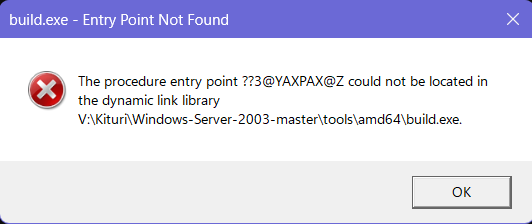
@Dietmar I also forgot to point out that the build.exe from the archive you sent me, build.exe is missing a dependency on all OSes! From XP to 11 O_O. EDIT: nevermind, I had to apply the patch after.
-
@Dietmar Sorry for asking this, but do you please have a updated diff patch of the V8 unreleased version of ACPI 2.0? I need it to be able to update XP's ACPI driver properly so I can power up the PWRMBASE of PMC, to power up LPSS for Intel GPIO and I2C controllers to be able to enumerate ACPI\ELAN1200 for my ASUS x509FA's touchpad, so I can able to use the touchpad on XP. This is the driver I am working on: https://github.com/UsefulVideos/I2C-Controller-XP/
-
That build.exe x64 is broken, it's doesn't even open on XP x64 for me... And If I switch to build.exe x86, compilation errors about wmilog.bmf and unable to find pch.pch files...
-
Please revert the title! It makes searching for this much more difficult!
-
Thank you!
-
On my latest Windows 11, I can't run build.exe (amd64)... @Dietmar
-
Thank you so much!
-
It doesn't work at all because the link from the download button was never archived... If you have it, publish a new download link please. https://web.archive.org/web/20230803065130/https://cdn-149.anonfiles.com/J1W9H1a8y1/7ffdf369-1691046090/W2003_tools_update.7z
-
@Dietmar Do you have the file? (W2003_tools_update.7z)
-
W2003_tools_update.7z link is invalid...
-
I am confused! Are you saying that I booted XP x64 with 4GB Decoding enabled on UEFI Class 3 laptop through CSMWrap?! Btw, did the PAE patches (that you have, from XP2ESD, I believe) do nothing for XP x86 using CSMWrap?
-
@Dietmar Just so you know. I also used CSMWrap on my UEFI Class 3 laptop ASUS x509FA, and so far I have no issues with booting XP x64 on UEFI Class 3 using CSMWrap (partitions set at MBR) at all (just like Gelip/Reboot12 said, with CSMWrap graphics don't show at all on ntldr for me, but on winload.exe with vbemp, I can see the display). I have no option for 4G decoding, and it isn't even specified in CSMWrap's log for my case (so I guess it's always disabled in my laptop). The assumption that CSMWrap needs CSM to boot isn't true because you need to explain how it works without problems in my case (on my Windows 11 UEFI Class 3 laptop that has no CSM at all). I hope you debugged the problems related to CSMWrap and sent them to FlyGoat on GitHub.
-
Sysprep WinXP SP2 64-bit on pure UEFI - V3
UsefulAGKHelper replied to reboot12's topic in Windows XP 64 Bit Edition
By errors I can also mean things not working they way they should like the display freezing but the OS still loading. Btw, I am only talking about XP x64 on UEFI x64. -
Sysprep WinXP SP2 64-bit on pure UEFI - V3
UsefulAGKHelper replied to reboot12's topic in Windows XP 64 Bit Edition
@reboot12 Regarding your solution of always using vga.sys at first deployment, you can also change the service in your video driver by changing the Service string to the name of VgaSave from Vga inside the enum key, to the key that matches that hardware ID of the driver (change permissions in the Enum key to edit the contents inside the Enum key). If the installation of any driver has removed the service needed by that driver (due to inf errors etc), the keys can be added to the key matching your hardware ID (assuming that the service was present but didn't integrate properly in the driver's enumeration entry) to prevent future errors in the respective driver (as you see in your enum key, the keys match the hardware IDs of the driver you're looking for). For example, I use vbemp legacy vga driver (as the VgaSave service instead of the ms vgasave) and it's always loaded on the device manager without errors. I disabled pnp vbemp (to prevent delay at bootscreen) and I used only the non-pnp vbemp driver that is named vga.sys. -
I don't understand why I kept receiving infinite boot delay with this acpi.sys. The problem was fixed after using the previous acpi.sys that I had used.
-
Thank you so much!
-
@Mov AX, 0xDEAD @Dietmar Can you guys please give me the download link of the latest V8 WIP 2.0 acpi.sys that you have?
-
Sysprep WinXP SP2 64-bit on pure UEFI - V3
UsefulAGKHelper replied to reboot12's topic in Windows XP 64 Bit Edition
Btw I realized that in the vgapnp.sys and VGA.sys windows 7 generic drivers, they're still the same because the vgapnp.sys (from win 7) I have for XP has vga.sys as internal filename and has same size as the vga.sys file. -
Sysprep WinXP SP2 64-bit on pure UEFI - V3
UsefulAGKHelper replied to reboot12's topic in Windows XP 64 Bit Edition
Instead of deleting the display.inf file, rename it to display.inf.old to prevent the installation. I prefer methods that only disable and do not remove the files and services in case of problems (for backup purposes). -
Thank you for adding StartAllBack Canary, the system tray is back!
-
@Dietmar I would like to know how to debug individual drivers (sys files etc) on the same computer. How do you do it?
-
@Mov AX, 0xDEAD Is there a problem with the upcoming workarounds for ACPI 2.0? Is that why are you delaying?
-
Oh, that's terrible. How can this be fixed in Canary?