Multibooter
-
Posts
1,115 -
Joined
-
Last visited
-
Days Won
2 -
Donations
0.00 USD
Content Type
Profiles
Forums
Events
Everything posted by Multibooter
-
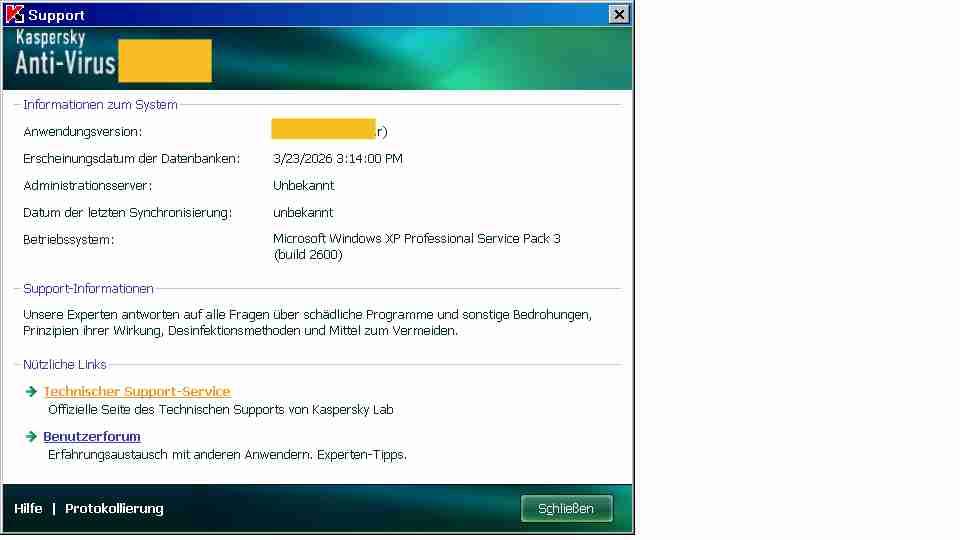
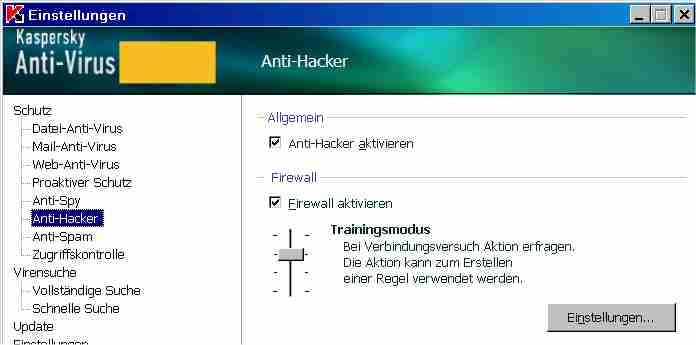
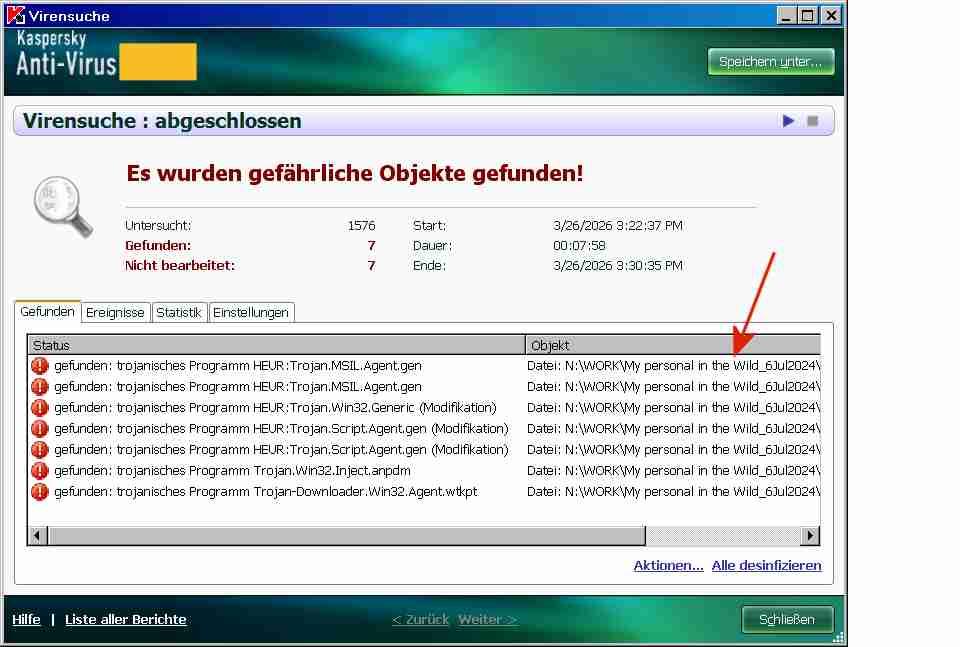
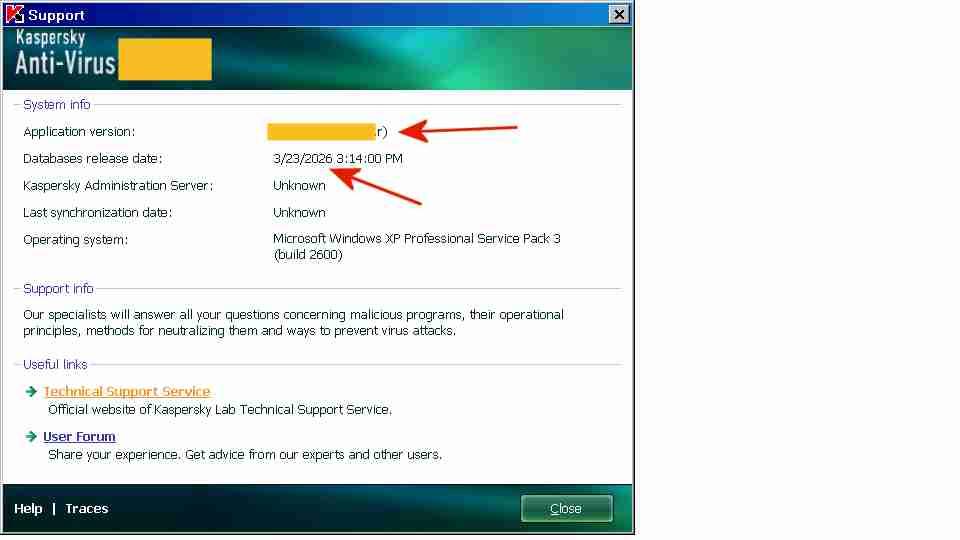
Foreign language versions of My Ancient Version of Kaspersky The English-language screenshots in the posting above are actually from the German version of My Ancient Version of Kaspersky. The foreign language versions of My Ancient Version of Kaspersky are bi-lingual versions: If you press F12 you switch to the English language interface, if you press F5 you switch to the foreign language interface, in this case the German version. Above are two screenshots with the German-language interface, displayed after switching to German by pressing F5. Pressing F5 and F12, for alternating between the English and the German language interfaces, may perhaps be useful for learning, for example, German computereze I have in my archive also a bi-lingual Russian version and an earlier build of the French version of My Ancient Version of Kaspersky. Altogether 12 foreign language versions were released: Chinese (Traditional and Simplified), Czech, Estonian, French, German, Hungarian, Italian, Japanese, Polish, Portuguese, Russian and Spanish. The only gripes I have about the bi-lingual foreign language versions, when compared to the English-only version, are the following; - the installation is in the local language - the context sensitive Help loads the context.chm Help file in the local language; the English context.chm is not included in the program - the context menu, when you right-click on a file or folder, remains in the local language, e.g. "Auf Viren untersuchen", instead of "Scan for viruses" - when you hover in the System Tray over the Kaspersky icon, the displayed text in the bubble (version and databases release date) remains in German. Otherwise the bi-lingual foreign-language versions, after having pressed F12, seem to work just like the English version. Even the context menu of the Kaspersky icon in the System Tray icon changes to English. Above is a screenshot of a virus scan, in German.

-
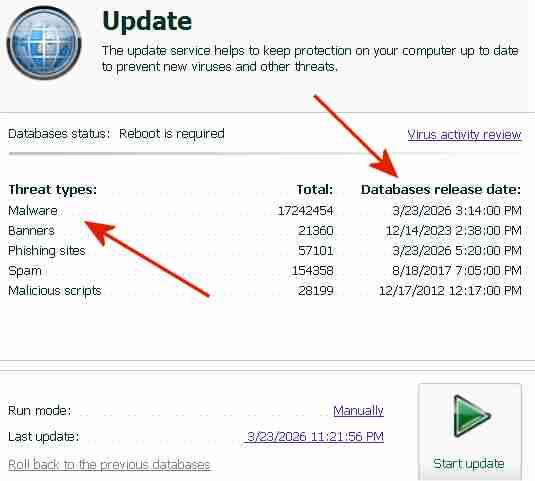
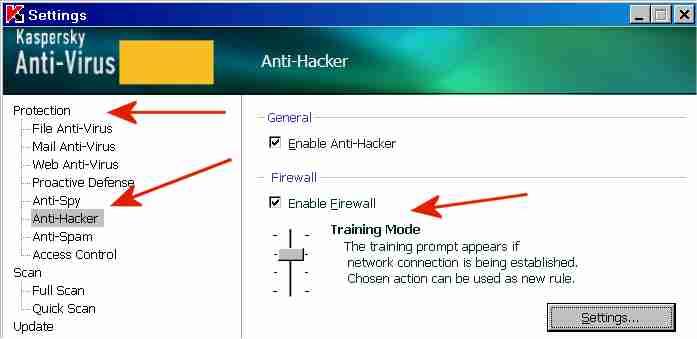
(the following text is a continuation of my postings at https://msfn.org/board/topic/184730-antimalware-firewall-and-other-security-programs-for-windows-xp-working-in-2023-and-hopefully-beyond/ The "Protection Components" of My Ancient Version of Kaspersky I have re-installed My Ancient Version of Kaspersky, which was previously installed without Protection Components. During the re-installation I have selected the "Virus Scan" component and all "Protection components". I can now confirm that no license key or activation is required to get the Protection Components of the trial version to work. 1) Installation details In order to install the Protection component "Kaspersky Anti-Hacker" (contains a firewall), an existing firewall software has to be uninstalled. It is not possible to have both Kaspersky Anti-Hacker and a firewall program like Kerio Personal Firewall 2.1.5 installed at the same time. After having uninstalled Kerio Personal Firewall 2.1.5, My Ancient Version of Kaspersky installed OK. A pre-existing firewall program does not have to be uninstalled, however, if other protection components shall be installed, provided that Kaspersky Anti-Hacker is not selected during the installation. After the re-installation, My Ancient Version of Kaspersky still had a very old signature date and was not yet updated to the ultimate final build. 2) Updating signatures and application modules I subsequently updated both the signatures and the application modules of My Ancient Version of Kaspersky in one swoop, from a combined update folder containing both new signatures (from Kaspersky Lab and, for components not supported anymore, from my archive) and the AutoPatches (from my archive, they are not available anymore at Kaspersky Lab servers). Only one update is possible with the trial version, without a license key and without activation. This single combined update has updated My Ancient Version of Kaspersky to the ultimate final build (".r" at the end, shown in the screenshot above), with the most recent program file digitally signed OK 26May2014 and the signatures for virus scanning updated to 23Mar2026. 3) Several Threat Types do not have a current signature: When Protection Components were installed, the signature update will also update the signatures of threat types used by the Protection components (see screenshot above). When only "Virus Scan" is selected during the installation and no "Protection components" are installed, the program will only be updated with signatures for "Malware", not with signatures for "Banners", "Phishing Sites" etc. The signatures for "Malware" are the essential ones, they used for virus-scanning and they are current. The sources of the signatures for the Protection components displayed above were the following: Banners: 14Dec2023, currently still available at Kaspersky Lab servers, i.e. signature support of this software version has stopped after 14Dec2023 Phishing sites: 23Mar2026, currently still available at Kaspersky Lab servers for the software version Spam: 18Aug2017, from my archive, no signatures were available anymore at Kaspersky Lab servers for the software version Malicious scripts: 17Dec2012, from the installer of the software, the signatures were not in my archive and were not available anymore at Kaspersky Lab servers 4) Protection Components
-
Links to security-related topics A) postings by Multibooter: Sandboxie under Windows XP - posted on 5Aug2024 https://msfn.org/board/topic/186405-sandboxie-under-windows-xp/ Kaspersky Anti-Virus 6.0 - posted on 30Dec2010 https://msfn.org/board/topic/149134-kaspersky-anti-virus-60/ B) postings by others: Antimalware, firewall, and other security programs for Windows XP working in 2023 and hopefully beyond - posted by AstroSkipper on 28Apr2023 https://msfn.org/board/topic/184730-antimalware-firewall-and-other-security-programs-for-windows-xp-working-in-2023-and-hopefully-beyond/ Which Antiviruses are Known for a Fact to be Working on XP SP3 as of 2019? - posted by spacequakes on 20Sep2017 https://msfn.org/board/topic/177099-which-antiviruses-are-known-for-a-fact-to-be-working-on-xp-sp3-as-of-2019/ VT Hash Check - posted by genieautravail on 8Apr2025 https://msfn.org/board/topic/186770-vt-hash-check-xp-compatibility-restored/
-
(Kept for future postings)
-
Anti-Virus and other Security Programs for Windows XP working in 2026 and maybe until 2030 This topic will focus on anti-virus and other security programs for Windows XP, which are still useful in 2026. The programs discussed here should have a good chance of still being useful for a long time, even if their official support has ended. Postings about anti-virus and other security programs for other older operating systems (e.g. Windows 2003 or Windows Vista) are also welcome, as well as postings about auxiliary programs which improve the functioning of these security programs.
-
Kaspersky Registry Editor is a Linux program able to edit the WinXP etc registry. It is not intended to be used as a normal registry editor under WinXP, but during infections when the registry is infected by ransomware and when you cannot use a normal registry editor under Windows to clean the registry. An example of the use of Kaspersky Registry Editor for the removal of ransomware is shown at https://www.malwareremovalguides.info/pum-userwload-trojan-ransom-removal-instructions/ "PUM.UserWLoad is a difficult to remove remnant of the Trojan.Ransom infection. PUM.UserWLoad is a register [=registry] reference [in] which the permissions are modified so that they can not be removed in the normal way." PUM.UserWLoad is the malicious registry entry belonging to one of the ransomware variants" In the above example Kaspersky Registry Editor made the use of Windows safer by removing infected stuff from the registry. Kaspersky Registry Editor was used to clean ransomware detected by Malwarebytes, which Malwarebytes could not remove from the registry. The ransomware article at www.malwareremovalguides.info includes screenshots of Kaspersky Rescue Disk 10, Kaspersky Registry Editor and Malwarebytes, all three working together. Kaspersky Registry Editor is not available as a separate program, only as a component of Kaspersky Rescue Disk, together with Kaspersky Anti-Virus. For my earlier posting about Kaspersky Registry Editor I had created a locked-up WinXP by setting the permission of the CurrentVersion key to DENY. I did not want to actually infect my computer with ransomware for my experiment, creating a locked-up WinXP was good enough. Both the locked-up WinXP in my experiment and the ransomware example about "PUM.UserWLoad TrojanRansom removal" have modified permissions in the registry.
-
I have checked Hiren's Boot CD 15.2 Restored v1.1 (Proteus) January 2013, actually a DVD with 2.76GB, but I didn't see Registry Editor PE. There are several versions 15.2, e.g. https://www.hirensbootcd.org/hbcd-v152/ [592MB], which lists Registry Editor PE 0.9c. is this the one? I booted with the 2.76GB version of Hiren's Boot CD 15.2, clicked on Antivirus - and surprise, surprise: it showed Kaspersky Rescue Disk 10 as only virus checker. The Kaspersky Rescue Disk 10 program on the Hiren 15.2 DVD was v10.0.31.4 of 7Feb2012, the signatures were of 9Jan2013, probably updated OK by Hiren for another 11 days because BASES.ID indicates 29Dec2012. Kaspersky Lab released several .isos of v10.0.31.4 with freshly updated signatures for about a year, between 3Mar2012 and 29Dec2012. The updated CD I described in my posting of 8Mar2026 is the final build v10.0.32.17 of 28Feb2013 of Kaspersky Rescue Disk 10, with signatures updated to 7Mar2026. The final build v10.0.32.17 must have been quite satisfactory to Kaspersky Lab because they updated the .isos of this final build with new signatures for over 4 years, from 22Feb2013 thru 30Aug2017. Both builds v10.0.31.4 and v10.0.32.17 of Kaspersky Rescue Disk contain the same build of Kaspersky Registry Editor.
-
A registry editor of WinXP, booting from a Linux boot CD, is a security program, permitting the cleaning of ransomware affecting the registry. As I mentioned above, AVG Rescue CD, Kaspersky Rescue Disk 10 and Norton Bootable Recovery Tool are included in the respective security programs for WinXP.
-
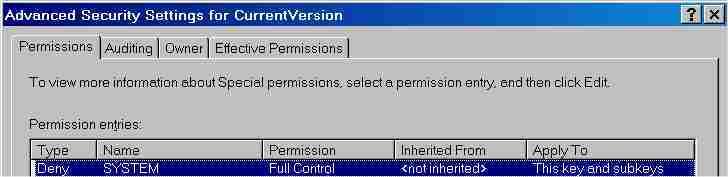
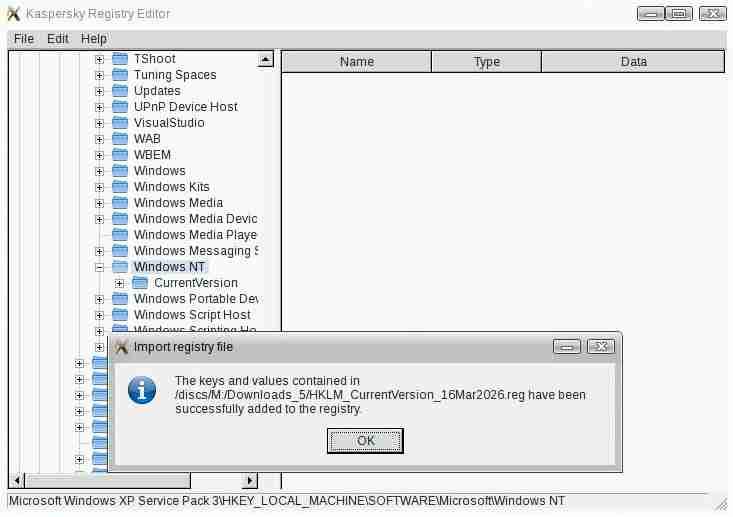
Kaspersky Registry Editor Experiment: I made Windows XP unbootable, for testing Kaspersky Registry Editor. The Windows XP operating system seems to have become unbootable by simply having set, with the regedit Windows registry editor, the permission of SYSTEM of the registry key HKLM\SOFTWARE\Microsoft\Windows\Windows NT\CurrentVersion to Deny: - in regedit browsed to HKLM\SOFTWARE\Microsoft\Windows\Windows NT\CurrentVersion -> right-clicked on CurrentVersion -> Permissions -> selected SYSTEM -> clicked on Advanced button -> selected SYSTEM -> clicked on Edit button -> clicked on any checkbox in column Deny -> OK -> clicked on Apply button -> OK WARNING: The above experiment was very dangerous. Don't repeat it, unless you know what you are doing, and only at your own risk. When booting again into Windows XP, the following message came up: Windows Product Activation. A problem is preventing Windows from accurately checking the license for this computer. (0x80070005) Pressing Alt-Ctl-Del didn't help. Pressing F8 while booting, for getting into safe mode, didn't help, eventually only a black screen with a blinking cursor was displayed. I was locked out. I definitely do not want to suggest a similarity between Windows Product Activation and ransomware. It might be interesting to see whether volume licenses of Windows, which do not require activation, have a similar locked-out problem. How to recover from being locked out? The easiest way was to restore the Windows XP partition from a previous partition backup image. Another recovery method, restoring the previously backed up registry key HKLM\SOFTWARE\Microsoft\Windows\Windows NT\CurrentVersion from a .reg file with Kaspersky Registry Editor, has also worked for me. Although Kaspersky Registry Editor cannot set permissions, Windows XP came up OK after importing CurrentVersion. Windows XP booted OK and worked OK just like before setting SYSTEM to Deny. Importing with Kaspersky Registry Editor the CurrentVersion key from a 5MB .reg file was extremely slow on my 25-year-old 650MHz Inspiron 7500 laptop, about 45 minutes using the Kaspersky Rescue CD. In my successful recovery attempt I had first deleted with Kaspersky Registry Editor the CurrentVersion key in the Windows XP registry, BEFORE importing the backup of the CurrentVersion key, In an earlier recovery attempt I had tried to import a 108MB backup .reg of the whole registry, without having deleted the content of HKLM\SOFTWARE\ beforehand. Importing the whole registry took 12+ hours and WinXP did NOT come up afterwards, it was stuck in a different crash loop. Deleting the registry key with Kaspersky Registry Editor BEFORE importing a .reg file with the corresponding registry key seems to be essential. A comparison of 6 rescue disks lists three (AVG Rescue CD, Kaspersky Rescue Disk 10 and Norton Bootable Recovery Tool) which contain a registry editor: https://char.learnwebcoding.com/help/rescue_disk_comparison.html \rescue\help\English\KRE.htm in the .iso seems to be the only documentation of Kaspersky Registry Editor. KRE.htm incorrectly indicates "for all Windows operating systems installed on a computer": Kaspersky Registry Editor does NOT display the Win98 registry, although it also displays the Win2003 registry on my old laptop, even if Win2003 is not listed among the system requirements of Kaspersky Rescue Disk 10: https://web.archive.org/web/20120609034308/http://support.kaspersky.com/viruses/rescuedisk?level=3 KRE.htm (file modification date 28Feb2012 in the .iso) indicates compatibility only up to Win7. The description page of Kaspersky Rescue Disk v10.0.32.17 (captured on 29Apr2014), however, indicates compatibility up to Win8: https://web.archive.org/web/20140429131943/http://support.kaspersky.com/4162 Kaspersky Registry Editor seems to work OK also under Win2003, I have made a preliminary test. The final build v10.0.32.17 of Kaspersky Rescue Disk 10 is of 28Feb2013, as indicated by the file modification date of \rescue\KRD.VERSION in the .iso. It contains the Kaspersky Registry Editor component and signatures of 22Feb2013. It can be downloaded from https://web.archive.org/web/20140627131637/http://rescuedisk.kaspersky-labs.com/rescuedisk/kav_rescue_10.iso A user guide for Kaspersky Rescue Disk 10 (revision date 30Apr2010, does not mention mention Kaspersky Registry Editor which was first contained in kav_rescue.iso v10.0.31.4 (29Apr2012)) can be downloaded from https://web.archive.org/web/20111007093941/http://support.kaspersky.com/downloads/guides/kasp10.0_rescuedisk_en.pdf Even if virus-checking is rarely done with a rescue CD, the registry editor on the CD may make the .iso interesting under WinXP, Win2003 and up to Win8, no idea under Win10/11.
-
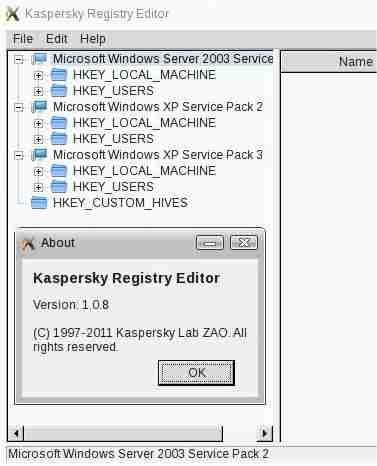
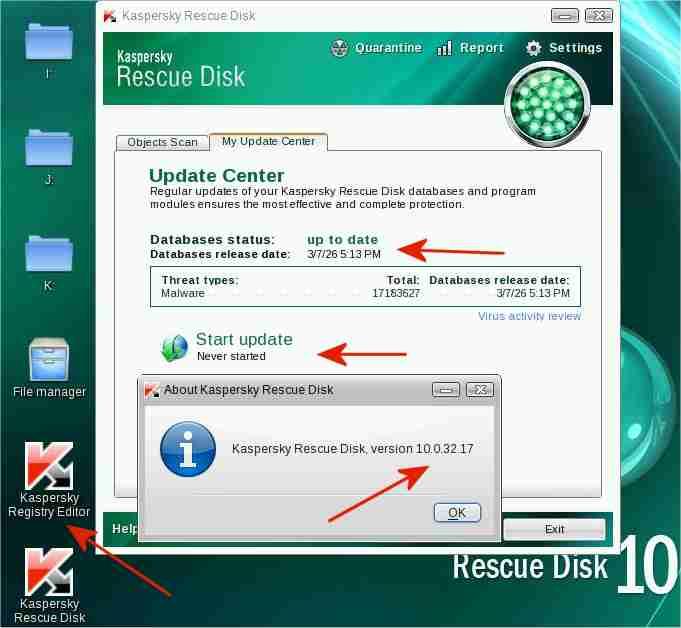
Kaspersky Rescue Disk 10 CD of 22Feb2013 with signatures updated to 7Mar2026 I have created an updated Kaspersky Rescue Disk 10 CD from: - a Kaspersky Rescue Disk 10 .iso of 22Feb2013 - signature updates of 7Mar2026. The signature updates were obtained under Windows XP from an update folder, updated by Kaspersky Updater (separate program). In my case, the update folder for My Ancient Version of Kaspersky was used. Creating such an updated CD is a little tricky. Updates of Kaspersky Rescue Disk 10 are usually stored separately on a HDD etc of the computer, not on the burnt CD. The updated Kaspersky Rescue Disk 10 CD has worked fine for me. The 4 red arrows in the screenshot above point to the following: - "Start update: Never started" indicates that all signatures are on the bootable CD, not on a HDD etc of the computer - "Database release date: 3/7/26"[=7Mar2026, with 17,183,627 signatures] indicates that the current signatures, obtained with Kaspersky Updater, were correctly incorporated into the updated .iso/CD - "Kaspersky Rescue Disk version 10.0.32.17" in the About screeen indicates that the program components were correctly incorporated into the updated .iso/CD - "Kaspersky Registry Editor" is a Linux-based registry editor to view or edit WinXP, Win2003, etc registries simultaneously, as when multiple operating systems are installed on a computer (multi-booting) Kaspersky Rescue Disk 10 of 22Feb2013 is safe to use The Russo-Ukrainian war started on 27Feb2014 https://en.wikipedia.org/wiki/Russian_occupation_of_Crimea Kaspersky software released before this date (27Feb2014) is most likely safe, Kaspersky software released after that date may or may not be safe. "These are not new concerns; going back to 2015 Kaspersky has been at odds with the US government" https://www.majorgeeks.com/news/story/kaspersky_banned_in_the_usa_what_you_need_to_know.html The program components of the updated Kaspersky Rescue Disk 10 CD were created more than a year BEFORE 27Feb2014 and are therefore, in my opinion, safe to use. The screenshot above of the Kaspersky Registry Editor, also on the Kaspersky Rescue Disk, shows the registries of the Win2003, WinXP SP2 and WinXP SP3 operating systems installed on my 25-year-old, 650MHz Pentium III Inspiron 7500 laptop. The Kaspersky Registry Editor cannot access or display the registry of the Windows 98SE operating system, also installed on the laptop. Kaspersky Rescue Disk 10 is freeware. Feel free to contact me in case of interest, as for testing or reviewing the updated CD, without having to access the Kaspersky Lab servers.
-
OT: I made a preliminary, quick test under Win98. I test-installed under Win98 a slightly earlier version, Kaspersky Anti-Virus v6.0.3.837 Workstation (MP3, 25Feb2009), then attempted to update using this newly-found AutoPatch. It did not work v6.0.3 requires different folder names in the update folder. I also got the error message: "License verification failed" when I tried to update. Maybe v6.0.3 does not have a free 1st update, in contrast to My Ancient Version of Kaspersky, I don't remember. 10+ years ago I had a valid license, now expired long ago, so I didn't have the issue "License verification failed". Summary: it didn't work but maybe I will look into it again, much later.
-
I did find a site which had links to many downloads of AutoPatches: https://filemood.com/result?q=autopatches Unfortunately, there were no AutoPatches for my Ancient Version of Kaspersky and the download links are dead bittorrent magnet links. Kaspersky Lab has 30+ products with signature updates, with different versions etc, so the chance is exceedingly small that the relevant AutoPatches are still available anywhere in the internet. Maybe in archives of corporate users of Kaspersky of 10+ years ago, although I doubt that corporations archive old stuff that long. OT: When I looked into my own personal archive I have found an AutoPatch containing avp.exe v6.0.3.851 for the last version of Kaspersky Anti-Virus for Windows 98. klif.sys in this newly-found AutoPatch is digitally signed OK 1Apr2009. I had previously thought that Kaspersky Anti-Virus v6.0.3.844 (28Apr2008) was the last version for Windows 98, but this newly-found AutoPatch may update the last Win98-compatible build of Kaspersky Anti-Virus even further. This AutoPatch seems to be a major final update, it contains 27 files. What confuses the matter is that this newly-found AutoPatch was in a sub-folder \6.0.3.830\ with a lower version number than Kaspersky Anti-Virus v6.0.3.844 (28Apr2008) for Windows 98. Eventually I will have to check whether this newly-found AutoPatch can be installed under Win98 and whether the resulting ultimate final build for Win98 can be updated with current signatures.
-
Unapplicable legal snippets. msfn.org is an international forum, not a USA forum. My Ancient Version of Kaspersky is definitely not an unlawful program for me or for the great majority here at msfn.org. Why don't you wear a head scarf in your msfn.org picture, to obey Iranian Islamic Law, to avoid offending strict Moslems? Maybe you should tell your fellow Canadians to stop travelling to Cuba in winter, because U.S. laws declare tourism to Cuba as illegal. There are good laws and bad laws. Would you have obeyed in 1935, as a good Canadian, the German Nuremburg Laws https://en.wikipedia.org/wiki/Nuremberg_Laws and betrayed Jews to German concentration camps? Would you have obeyed in 1964, as a good Canadian, the United States Jim Crow laws https://en.wikipedia.org/wiki/Jim_Crow_laws ordaining racial segregation and racial discrimination? There is no need to commiserate here with the lack of freedom of U.S. subjects. This is an international technical forum. Hopefully, U.S. subjects will eventually get their freedom back. And no more unapplicable legal advice from a U.S. fifth column in Canada.
-
To avoid actions by Kaspersky blocking my occasional updates. The size of each update is about 800MB traffic and Kaspersky has to pay for the traffic. I assume that they are already in a difficult financial position because of the US embargo. If they survive I assume that My Ancient Version of Kaspersky will still get free, current signature updates in 2030.
-
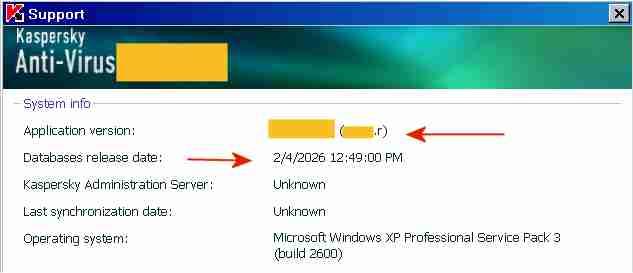
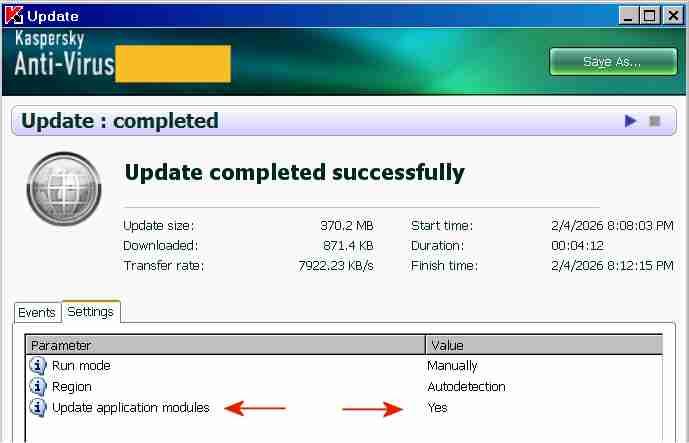
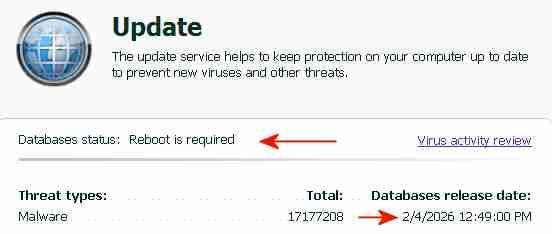
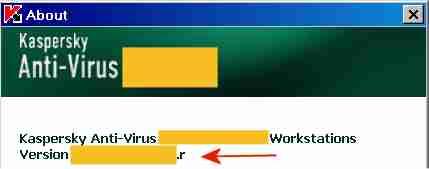
The "AutoPatches" for My Ancient Version of Kaspersky I succeeded in updating both the application modules and the signatures of My Ancient Version of Kaspersky with a single combined update, without a license key and without activation. By installing the final AutoPatches, My Ancient Version of Kaspersky has been updated to the ultimate final version, with the most recent program file digitally signed OK 26May2014. The screenshot above indicates the final AutoPatch "r" next to "Application version" and the Database release date "2/4/2026". Once knowing how-to, preparing future combined updates will be quite easy. The term "AutoPatches" by Kaspersky corresponds roughly to the term "Hotfix" by Microsoft. The screenshot above indicates "Update completed successfully" and "Update application modules: Yes". The signature updates were from a Kaspersky Lab update server, the application updates ("AutoPatches") were from my personal archive. Signature updates and application updates ("AutoPatches") were combined into a single update folder. The screenshot above indicates signatures of 2/4/2026 and the message: "Database status: Reboot is required". This message "Database status: Reboot is required" is displayed by My Ancient Version of Kaspersky when the update of the application modules via AutoPatches is pending. A tiny red square is added to the Kaspersky icon in the System Tray, indicating that AutoPatches are pending. During the reboot after the update, the Kaspersky driver updates and installs the program files contained in the AutoPatches and updates the registry, completely hidden and invisible to the user. StartUp Organizer, for example, which I use as a watch dog, does NOT notice any changes before, during and after the reboot. After rebooting and AutoPatching, the Kaspersky icon in the System Tray looks normal again, without a tiny red square. The successful installation of the AutoPatches is indicated in the About screen above by the display of "r" [=version of the AutoPatches] next to the Version (Note: the About screen is displayed by right-clicking on the Kaspersky icon in the System Tray -> About) and in the Support window (1st screenshot, at the top of this posting). Also, LastSuccessfulUpdate in the registry contains a hex value (Unix timestamp), which confirms that the update was successful. Furthermore, virus-checking with the updated application module and the new signatures works fine. The installation of the final AutoPatches plus a signature update of My Ancient Version of Kaspersky had faced three challenges: 1) The files of the final AutoPatches were removed from the Kaspersky Lab update servers and are most likely not available anywhere in the internet. 2) Kaspersky Lab does not provide license keys for My Ancient Version of Kaspersky anymore, which would permit multiple updates. My Ancient Version of Kaspersky is an unexpiring trial version and can only be updated once. An initial update with the final AutoPatches followed by a second update with current signatures is therefore not possible. Only one update is possible, either an update of the signatures from the Kaspersky Lab server or an update of the application module from my personal archive, but not both.. 3) The digital signature of the .xml file in the subfolder \index\ in the update folder impedes the combining of AutoPatches and current signatures into a single update folder. Before August 2019 the online updates from Kaspersky Lab of My Ancient Version of Kaspersky had consisted of three sub-folders: \AutoPatches\, \bases\ and \index\. After August 2019 no sub-folder \AutoPatches\ is created when downloading updates. The sub-folder \AutoPatches\ contained updates of the installed application modules, \bases\ contained the signature updates and \index\ contained only a .xml file validating \AutoPatches\ and \bases\. The .xml file in \index\ contains at the end a string which is an encoded digital signature generated using the private signing key of Kaspersky Lab. Changing text in the .xml file without updating the signature at the bottom will result in the error message "Invalid file signature" when trying to update. The final release of December 2012 of My Ancient Version of Kaspersky had been updated by several sets of "AutoPatches" supported by Kaspersky until 2017, identified by a letter of the alphabet appended to the build number of Kaspersky Anti-Virus. The last AutoPatch for My Ancient Version of Kaspersky is "r" and contains for example an updated basegui.dll, digitally signed OK 26May2014. The AutoPatches for My Ancient Version of Kaspersky were available from the Kaspersky Lab update servers until about 2018. When I tried to update in August 2019, all files of the AutoPatches for My Ancient Version of Kaspersky had been removed from the Kaspersky Lab update servers and My Ancient Version of Kaspersky could not be updated to release "r" (about 26May2014) anymore. The application modules of My Ancient Version of Kaspersky consequently remained those of the final release of December 2012, without any AutoPatches applied.. In addition Kaspersky Lab removed the text string which identified My Ancient Version of Kaspersky, from the digitally signed .xml file in \index\ downloaded from Kaspersky. Kaspersky Lab must have decided by August 2019 to definitely stop supporting My Ancient Version of Kaspersky, because they removed the application update files from their update servers and made it generally impossible to update the program with AutoPatches by removing the string permitting updates of My Ancient Version of Kaspersky from the digitally signed .xml in \index\. The final AutoPatches, including "r", probably also improve the Protection Components of My Ancient Version of Kaspersky. I have used My Ancient Version of Kaspersky only as an on-demand scanner, I have no need for the Protection Components. Nevertheless, I may eventually add the Protection Components to the installation, for further testing and to see whether activation is required to get the Protection Components to work. According to the User Guide of My Ancient Version of Kaspersky, if you select "Activate later" after installation, "you will have access to all the application's features, except for updates (only one application update will be available)".
-
in my next attempt to activate Panda under WinXP I have used a genuine gmail email address. After entering the email address in window "Activate Panda Dome", Panda Dome again displayed "Error checking the account. We're sorry but we were unable to access your Panda account. Make sure you have an Internet connection and try again."
-
Which programs did you revive by updating their OpenSSL components? Do you still use them under WinXP?
-
MS Visual C++ 2015-2019 Redistributable v14.27.29114 (WinXP, 26Oct2020) can be downloaded from: https://download.visualstudio.microsoft.com/download/pr/c168313d-1754-40d4-8928-18632c2e2a71/D305BAA965C9CD1B44EBCD53635EE9ECC6D85B54210E2764C8836F4E9DEFA345/VC_redist.x86.exe was listed together with many other download links at: https://forum.ru-board.com/topic.cgi?forum=5&topic=24691&start=320 MS Visual C++ 2015-2019 Redistributable v14.28.29213 (WinXP, 13Aug2020) can be downloaded from: http://download.visualstudio.microsoft.com/download/pr/566435ac-4e1c-434b-b93f-aecc71e8cffc/0D59EC7FDBF05DE813736BF875CEA5C894FFF4769F60E32E87BD48406BBF0A3A/VC_redist.x86.exe was listed together with many good comments at: https://www.vogons.org/viewtopic.php?t=84578&start=80 MS Visual C++ 2015-2019 Redistributable v14.29.30139 (WinXP, 10Dec2021) can be downloaded from: http://download.visualstudio.microsoft.com/download/pr/b929b7fe-5c89-4553-9abe-6324631dcc3a/4C6C420CF4CBF2C9C9ED476E96580AE92A97B2822C21329A2E49E8439AC5AD30/VC_redist.x86.exe emberedison in his posting on 1Dec2025 warns against v14.29.30139, "14.28.29213.0 is work", https://community.pcgamingwiki.com/files/file/2883-microsoft-visual-c-redist-2015-2019-for-windows-xp/ Unfortunately, builds 14.27.29114 and 14.28.29213 do NOT install under WinXP on my SSE-only Inspiron 7500 (Pentium III), they seem to require SSE2. The excellent "MS Visual C++ Runtime Packs 2005-2015 (Kurt_Aust, RyanVM)", however, contains vcredist2015_x86.exe v14.0.24215.1 which installs OK on my Inspiron 7500 with SSE-only. OpenSSL v3.6.0 (32bit, Light, 8Oct2025), in turn, installs OK under WinXP on my SSE-only Pentium III laptop after having installed vcredist2015_x86.exe v14.0.24215.1 from Kurt Aust. "MS Visual C++ Runtime Packs 2005-2015 (Kurt_Aust, RyanVM)" can be downloaded from https://www.mediafire.com/file/03xebkxhpvlpep8/Visual_C_redist_32-bit_05_08_10_12_13_15.7z/file BIG QUESTION: Is there any benefit for a non-programmer to install OpenSSL under WinXP?
-
KB2839299_2003 derived fltMgr upgrade that it is not...
Multibooter replied to modnar's topic in Windows XP
Besides speed, system stability could be another criteria for deciding between fltmgr.sys build 5107 and build 6912 under WinXP. eMule could be used for comparing system stability/uptime when running with fltmgr.sys build 2180 [WinXP SP2] vs build 5107 vs build 6912. eMule, installed under WinXP SP2 and running 24/7 on a dedicated old Inspiron laptop (500MHz, SSE-only, 512MB RAM), tends to crash with the original fltmgr.sys build 2180 after downloading for 7-14 days. Build 5107 has been installed to see whether it can increase eMule uptime, i.e. system stability. -
We finally agree on something!
-
https://www.virustotal.com/gui/file/767b877e735c425bf05c34683356abfde4070b092f17a4741ea5ac490611f3de https://www.virustotal.com/gui/file/9f805311953057a944567d9a2e45ee4d65ffb7804925115b3b05bf02d3ff7821
-
Thanks, AstroSkipper. But pw-protected "ProxHTTPSProxy_TLS_1_3_1_5_220717_PopMenu_3V3_CheckedByAstroSkipper.7z", containing your software package, has still the same issue (false positives by Kaspersky) which I posted on 14Jan2025, https://msfn.org/board/topic/183352-proxhttpsproxy-and-httpsproxy-in-windows-xp-for-future-use/page/61/ cacert_updater.exe and cmdow.exe inside your package still get flagged as Trojan and riskware by Kaspersky. mediafire: "This file was uploaded from Germany on January 14, 2025 at 9:50 AM" I surely want to believe that your package is clean. Maybe you can make these two files look clean or replace them, not just password-protect them? Many good little files have disappeared into oblivion because they were flagged.
-
Owned 100% by a U.S. company with U.S. government contracts? On the other side of the globe: Eugene Kaspersky's background? Searching with the Yandex search engine for: Kaspersky Putin lists interesting articles, for example the 2012 article https://www.brookings.edu/articles/russias-top-cyber-sleuth-foils-us-spies-helps-kremlin-pals/
-
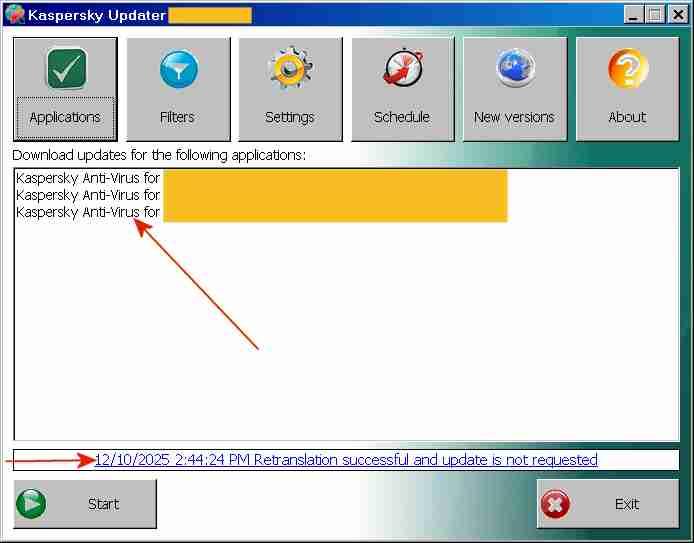
That looks too tricky to me, at least for testing Panda. Do you have simple instructions for installing the TLS stuff under WinXP? In contrast, updating the various versions and editions of My ancient version of Kaspersky in one swoop is quite simple. I just use a little corporate utility, Kaspersky Updater, to create/update a single update distribution folder from which 30+ Kaspersky programs can be updated off-line. Below is a screenshot of this little corporate utility, which I used for updating 3 different Kaspersky programs, the normal workstation edition, the specced-down workstation edition and the server edition. This screenshot shows the signature update of 10Dec2025 for my posting "My ancient version of Kaspersky under Windows 10" of 15Dec2025. https://msfn.org/board/topic/184730-antimalware-firewall-and-other-security-programs-for-windows-xp-working-in-2023-and-hopefully-beyond/page/82/#comments The message "... Retranslation successful" means that the update was successful and that the update distribution folder was filled OK. No idea what the part "and update is not requested" refers to. Kaspersky Updater here was run under Windows Server 2003 (blue window title) and updating under WinXP and Win10 from the update distribution folder worked OK. No need to register with an email address and to fiddle around with TLS stuff under WinXP.
-
Using different emails does NOT protect your privacy. United States spy agencies identify people by name, email address(es), phone numbers, IP numbers assigned etc. OT: the header of a Jeffrey Eppstein FBI file recently released indicates also the IP number as a personal identification trait, together with the date of birth. https://web.archive.org/web/20251227130144/https://www.miamiherald.com/public/latest-news/2wwvfa/picture313924496/alternates/FREE_1140/Screenshot 2025-12-23 115102.png In many countries the router IP number assigned by Internet providers is nearly impossible to change. You can pull the power plug of the router and reconnect it, but still the same router IP number.